 By ^Neptune on Sep 25, 2008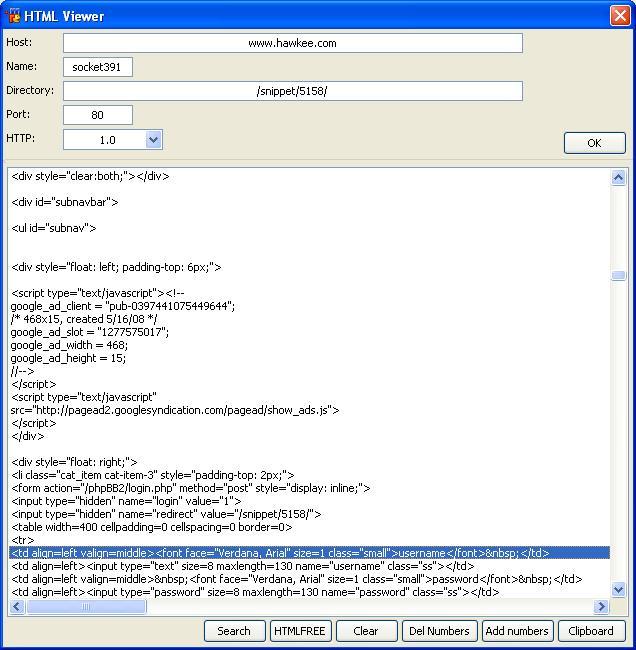
First off, thanks to Lindrian for helping me with the html.search alias. $didwm and $didreg on their own were being kinda gay, but whatever.
NOTICEPut this in your remotes and type /html.
This is the HTML Viewer I made, seeing as I've learned sockets now, I decided to make something around HTML itself. Pretty original idea, that's what I wanted, and I don't think I've seen one of these before.
What this does is view the HTML of the site that you put into the dialog. I can see a hell of a load of posts coming my way on "how do I use this?", so let me clarify.
Steps:
1) Get a website you want to use (obviously).
2) In the HOST edit box, put the host. So whatever site you are using, this is the main bit. For example, if I were to search anywhere in hawkee, the host would be: www.hawkee.com. Basically, put whatever is in your internet browser before any subdirectories of the site, excluding the http://
3) Choose the socket name. Not that this really matters.
4) Input the directory. Example: if I was viewing http://www.hawkee.com/profile/img/2158/, I would put /profile/img/2158/ as the directory.
5) Choose your port. If you're using this script you should know what you're doing. If you don't by any chance, use 80, as it's usually the best.
6) Choose your HTTP protocol. Not much difference between them really.
7) Press OK.
Woo! Now you've loaded some HTML into the viewer. Obviously, you're gonna want to be able to have edit options to ease your use.
Features:
;Search
A really good option. If you need to find some text, use this! You can also search with regex, which is a neat option too.
;HTMLFREE
This strips what's in the list of its HTML.
;Clear
Um.. no explanation needed. :/
;Del Numbers
This deletes any added numbers (see Add Numbers).
;Add Numbers
This adds line numbers to the HTML so you can easily find what you're looking for.
;Clipboard
Copies the selected line to your clipboard for pasting.
Suggestions and feedback would be much appreciated. Enjoy!
alias html { dialog $iif($dialog(html),-v,-m) html html }
dialog html {
  title "HTML Viewer"
  size -1 -1 315 309
  option dbu
  edit "", 1, 30 2 230 10, autohs center
  list 3, 2 69 311 225, hsbar vsbar size
  button "HTMLFREE", 4, 133 295 32 12
  button "Clear", 5, 166 295 32 12
  button "Add numbers", 6, 239 295 37 12
  button "Clipboard", 7, 277 295 35 12
  text "Host:", 2, 2 3 17 8
  edit "", 8, 30 26 230 10, autohs center
  text "Directory:", 9, 2 27 25 8
  edit "", 10, 30 38 35 10, autohs center
  text "Port:", 11, 2 39 17 8
  text "HTTP:", 12, 2 51 20 8
  combo 13, 30 50 50 35, drop
  box "", 14, 0 64 320 1
  button "OK", 15, 280 51 32 12
  edit "", 16, 30 14 35 10, autohs center
  text "Name:", 17, 2 15 17 8
  button "Search", 18, 100 295 32 12
  button "Del Numbers", 19, 199 295 39 12
}
on *:dialog:html:init:0: {
  did -a $dname 13 $str($chr(160) $+,10) 1.0
  did -a $dname 13 $str($chr(160) $+,10) 1.1
  did -c $dname 13 1
  did -a $dname 10 80
  did -a $dname 16 socket $+ $rand(1,1000)
}
on *:dialog:html:sclick:*: {
  if ($did == 15) {
    set %sockhtml $did(1).text
    set %socksock $did(16).text
    set %sockport $did(10).text
    sockopen %socksock %sockhtml %sockport
    sockmark %socksock $did(1).text $did(8).text
    set %sockhttp HTTP/ $+ $iif($did(13),$v1,1.1)
  }
  if ($did == 4) {
    if (!$did(3).lines) {
      noop $input(There is no text to strip HTML from!,uwo,Error!)
    }
    else {
      var %c = 1
      while (%c <= $did(3).lines) {
        did -o $dname 3 %c $htmlfree($did($dname,3,%c))
        inc %c
      }
    }
  }
  if ($did == 5) {
    if (!$did(3).lines) {
      noop $input(There is nothing to clear!,uwo,Error!)
    }
    else {
      did -rz $dname 3
      unset %sockvar %sockhtml %socksock %sockhttp %sockport
    }
  }
  if ($did == 6) {
    if (!$did(3).lines) {
      noop $input(There is no HTML to add numbers to!,uwo,Error!)
    }
    else {
      var %n = 1
      while (%n <= $did(3).lines) {
        did -o $dname 3 %n %n $+ . $did($dname,3,%n)
        inc %n
      }
    }
  }
  if ($did == 7) {
    if (!$did(3).sel) {
      noop $input(You have not selected anything to copy!,uwo,Error!)
    }
    else {
      clipboard $did(3).seltext
    }
  }
  if ($did == 18) {
    noop $iif($did(3).lines,$dialog(htmlsearch,htmlsearch,-4),$input(There is nothing to search for!,uwo,Error!))
  }
  if ($did == 19) {
    if (!$did(3).lines) {
      noop $input(There is no HTML to delete numbers from!,uwo,Error!)
    }
    else {
      var %v = 1
      while (%v <= $did(3).lines) {
        var %remnum = $did(3,%v).text
        if ($gettok(%remnum,1,46) isnum) {
          did -o $dname 3 %v $remove(%remnum,$gettok(%remnum,1,32))
        }
        inc %v
      }
    }
  }
}
alias htmlfree { return $regsubex($1-,/(^[^<]*>|<[^>]*>|<[^>]*$)|&[^;]+;|       /g,$null) }
on *:SOCKOPEN:%socksock: {
  if ($sockerr) {
    noop $input(An error occurred while opening the socket.,uwo,Error!)
    unset %sockvar %sockhtml %socksock %sockhttp %sockport
  }
  else {
    sockwrite -nt $sockname GET $iif($gettok($sock($sockname).mark,2,32),$v1,/) %sockhttp
    sockwrite -nt $sockname Host: $gettok($sock($sockname).mark,1,32)
    sockwrite -nt $sockname $crlf
  }
}
on *:SOCKREAD:%socksock: {
  if ($sockerr) {
    noop $input(An error occurred while reading data from the socket.,uwo,Error!)
    unset %sockvar %sockhtml %socksock %sockhttp %sockport
  }
  else {
    var %sockvar
    sockread -f %sockvar
    if ($dialog(html)) {
      did -a html 3 $replace(%sockvar,$chr(32),$chr(160))
      .timerhtml -m 1 200 did -z html 3
    }
  }
}
dialog htmlsearch {
  title "Search HTML"
  size -1 -1 162 38
  option dbu
  radio "Match text:", 1, 2 3 42 8
  radio "Match regex:", 2, 2 13 45 9
  edit "", 3, 50 2 110 10, autohs
  edit "", 4, 50 13 110 10, autohs
  button "Find next", 5, 95 24 32 12
  button "Cancel", 6, 128 24 32 12, cancel
}
on *:dialog:htmlsearch:edit:*: {
  if ($did == 3) {
    if ($did(1).state == 1) {
      if (!$did(3).text) {
        did -b $dname 5
      }
      else {
        did -e $dname 5
      }
    }
  }
  if ($did == 4) {
    if ($did(2).state == 1) {
      if (!$did(4).text) {
        did -b $dname 5
      }
      else {
        did -e $dname 5
      }
    }
  }
}
on *:dialog:htmlsearch:init:0: {
  did -b $dname 4,5
  did -c $dname 1
}
on *:dialog:htmlsearch:close:*: { unset %html.search }
on *:dialog:htmlsearch:sclick:*: {
  if ($did == 2) {
    did -e $dname 4
    did -b $dname 3
  }
  if ($did == 1) {
    did -e $dname 3
    did -b $dname 4
  }
  if ($did == 5) {
    if ($did(1).state == 1) {
      html.search $did(3).text
    }
    elseif ($did(2).state == 1) {
      html.search -r $did(4).text
    }
  }
}
alias html.search {
  if (-r == $1) { var %a $didreg(html,3,$2,$iif(%html.search,$v1,1)) }
  else { var %a $didwm(html,3,$iif(-w = $1,$2,$1),$iif(%html.search,$v1,1)) }
  if (%a) { did -c html 3 %a }
  else {
    did -c html 3 1
    noop $input(End of HTML. No other matches have been found.,uwo,Find text)
  }
  %html.search = %a + 1
}

all right lets see where to begain....
for those of you who have problem with html being in upper case. sorry it does not matter html can be in both cases and still be valid code with w3c validator
As for the purpose of the script i love. I am a html code for Freecode Team so i very much like this. because i have those times when i am chatting with the rest of freecode and going back and forth to our dev site looking at the source. good job!
sorry neptune but indented html is very messy. i think u should have left it the way the page is coded. but thats just me so not taking any rating points off for tht :p
the mirc code itself it nice. think it could go into a .mrc file but this works too.

You do the port like this: http://www.hawkee.com:80/snippets/ but the default should just be 80 if it's not in the URL.

Although you can't pull a port to use.
I guess you could do "http://www.somesite.com/something.html:80". But it'd probably be better to just leave the port field.