 By Hawkee on Mar 07, 2009
This code will search the Snippets section of Hawkee.com and return a list of matching snippets on your iPhone. It demonstrates how to retrieve data from a URL and parse it using a regular expression.
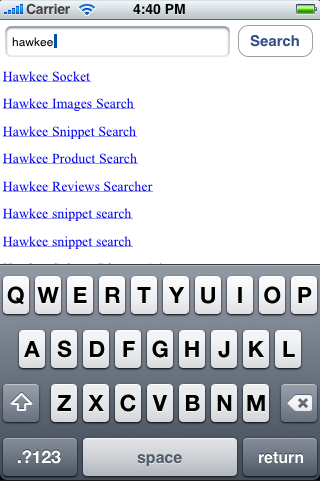
This expands on a very basic Cocoa Touch example by Matt Long:
http://www.cimgf.com/2008/10/01/cocoa-touch-tutorial-iphone-application-example/
First complete his instructions. He's got a video that makes the process very clear.
After you've completed his tutorial you need to go to Basic_iPhone_AppAppDelegate.h and add a UIWebView for the search results:
IBOutlet UIWebView *web;
Feel free to remove the Label as it isn't necessary for this example.
Next you need to return to the Interface Builder by double clicking MainWindow.xib under Resources. Here you can delete the Label and drag a UIWebView into place as seen here:

Be sure to connect it to your "web" IBOutlet with a control click as you did in the original tutorial.
Next you'll need to download and include the RegexKitLite library. Add RegexKitLite.h and RegexKitLite.m to your Classes folder and follow these steps to add a linker flag to make the library work properly:
Project > Edit Active Target
Select the "Build" tab
Find "Other Linker Flags"
Add "-licucore" to the value column
Finally use the following snippet to replace the "click" IBAction you created in the example code:
- (IBAction)click:(id)sender;
{
    // Appends the textField search query to the search URL and gets the resulting HTML
    NSString *searchTerm = [textField text];
    NSMutableString *hawkeeURL = [[NSMutableString alloc] initWithString:@"http://www.hawkee.com/snippets/?search_query="];
    [hawkeeURL appendString:searchTerm];
    NSURL *url = [[NSURL alloc] initWithString:hawkeeURL];
    NSString *result = [[NSString alloc] initWithContentsOfURL:url];

    // This will contain the HTML we build from parsing the resulting HTML
    NSMutableString *page = [[NSMutableString alloc] initWithString:@"<span style='font-size: 30px;'>"];

    // Regular expression to match the link to the snippet
    NSString *regexString  = @"<a href='(.+)' class='large'>(.+)</a>";

    // Set these to empty values at first
    NSRange   matchedRange = NSMakeRange(NSNotFound, 0);
    NSError  *error        = NULL;

    // Determine the length of the HTML and search within that range
    int length=[result length];
    NSRange searchRange = NSMakeRange(0, length);

    // done is true when the matchedRange it beyond the length of the result
    Boolean done = false;
    while(!done)
    {
        matchedRange = [result rangeOfRegex:regexString options:RKLNoOptions inRange:searchRange capture:1 error:&error];

        // Make sure we found a match within the length of the document
        if(NSMaxRange(matchedRange) <= length)
        {
            // Grab the first match which is the URL
            NSString *snippetURL = [result substringWithRange:matchedRange];

            // Grab the second match which is the snippet name
            matchedRange = [result rangeOfRegex:regexString options:RKLNoOptions inRange:searchRange capture:2 error:&error];
            NSString *snippetName = [result substringWithRange:matchedRange];

            // Build a link to append to the resulting HTML page.
            [page appendString:@"<a href='http://www.hawkee.com"];
            [page appendString:snippetURL];
            [page appendString:@"'>"];
            [page appendString:snippetName];
            [page appendString:@"</a><br><br>\n"];

            // Now start a new range after the previous match that goes to the length of the page.
            searchRange = NSMakeRange(NSMaxRange(matchedRange), length - NSMaxRange(matchedRange));
        }
        else done = true;
    }
    [page appendString:@"</span>"];

    [web loadHTMLString:page baseURL:nil];

    [hawkeeURL release];
    [url release];
    [result release];
    [page release];

    return;
}

I'd like to have the search box in one view, then after the search term or phrase is entered, to display the results in another view. I'm having trouble keeping my UITextField *searchTextField object available when I go to the results view I've created. Can you show an example of your code where you split it into a search view and a results view? Thanks!

Thanks for this! I just started on my 2nd app.. (first is in review and probably will be for another week at least, but I'll post an image if/when it gets approved) ...and I wanted to use regex but when I added the regexkitlite.h and .m files I got 13 errors, figured I did something wrong and almost gave up. Then I remembered you had a snippet posted and your walkthrough at the end saved me, thanks!
I included the RegexKitLite.h/.m file..... I didnt include the RKLMatchEnumerator.h/.m . I did that. It is still giving the same errors. I cleaned the Targets and rebuild the code... Still the same errors....
Just to tell you I went through documentation for RegexKit framework and saw how to connect it and did those steps to like copying it in the target/link Binaries... Was I supposed to do that???
Thanks for such a fast reply. Appreciate it. :)
Hi. Thank for the tutorial... i am getting two errors in this code one is
..../WebSearchAppDelegate.m:48: error: 'RKLNoOptions' undeclared (first use in this function)
..../WebSearchAppDelegate.m:48: warning: 'NSString' may not respond to '-rangeOfRegex:options:inRange:capture:error:'
..../WebSearchAppDelegate.m:48: warning: (Messages without a matching method signature
..../WebSearchAppDelegate.m:48: error: incompatible types in assignment
..../WebSearchAppDelegate.m:57: warning: 'NSString' may not respond to '-rangeOfRegex:options:inRange:capture:error:'
..../WebSearchAppDelegate.m:57: error: incompatible types in assignment
Did anyone try this code???? Is it working for you guys....
Please help me.... It will help me in my project a lot.....
Thanks again for the tutorial..... :)
this is the best way for me to learn a new language. i really appreciate you posting this.
as far as which phone is better, i'll stick with the iphone for now. heard a lot of bad things about the storm but it's supposedly better after firmware upgrades. it's a bummer that the g1 doesn't have multi touch, but how often is it really used? zooming in on images, maps, websites, blah. hopefully android will be on an att phone soon. then again, i may switch to verizon if a better phone comes their way.