Hover Info
mIRC Code
+ 11 likes
Please Register to submit score.
| Average Score | 7.4 (of 16 scores) |
| Date Added | Nov 07, 2008 |
| Last Updated | Dec 12, 2008 |
| Tags | hover info lazy mirc mouse nirc who whois |
Introduction


Update: Now uses $duration for the idle calc for faster and more accurate idle checking.
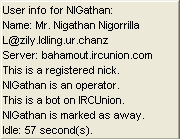
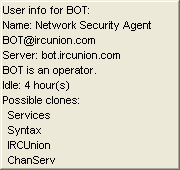
Updated: Now it will display any clones matching their address. (See first pic)
This script will allow you to easily get info of a user without whois'ing them! (No matter their oper status, they wont be able to see it)
Just hover your mouse over someones nick for a few seconds. Note: It will not work in the userlist.
It will display the following info:
-Full name
-Address
-Server
-Registered
-Operator status
-Bot status (+B)
-Away status
-Current idle time
Note: Not all of these will display for every server. Some servers dont let you get this info wothout an actual /whois. Although I have only come across one network like this.
If you have any raw 352 events that echo then you may want to add the if statement in this script to that raw so you dont see it every time you use this.
To install just copy to a new remote and save if you like then click ok.
Note: For best results use mIRC v6.34+. Earliest working version tested is 6.31 but the pic window didn't fully work.
Update:
Helped fix a slight bug when looking up info on a user when there is a very similar nick in the same channel. Note: This isn't fully fixed, but it is a step towards it. Right now it will work as long as all of the similar nicks all have the same +q/a/o/h/v modes set so they are next to each other on the list. If there is a single nick between them, it may look up the wrong person.
mIRC Snippet:
Hover Info
Posted on Nov 7, 2008 11:20 am
I get * Invalid format: $nick (line 8, Goofy)
Line 8 --> var %gh $nick($active,%g)
mIRC Snippet:
Hover Info
Posted on Nov 7, 2008 11:29 am
Your version is too early. Please use the latest mIRC.
The version you have doesnt support the newer $nick.
mIRC Snippet:
Hover Info
Posted on Nov 7, 2008 11:45 am
Ha, Awesome NIGathan i could use this for so many more things i think;p.Well done man."Rate It? Or Hate It?"...9/10.Thats a high rate from me but i have no errors and it best of all works well.`-.-´
mIRC Snippet:
Hover Info
Posted on Nov 7, 2008 11:47 am
Heh, thanks a lot man and wow... a 9 is quite surprising from you lol :D
mIRC Snippet:
Hover Info
Posted on Nov 7, 2008 12:00 pm
yup have to agree there its a useful code, used it also without errors, will keep this handy fro my script. nice work NIGathan
mIRC Snippet:
Hover Info
Posted on Nov 7, 2008 1:02 pm
all i have to say about the Hover Info is this
* Invalid format: $nick (line 8, HoverInfo.mrc)
mIRC Snippet:
Hover Info
Posted on Nov 7, 2008 1:05 pm
All I have to say about TheWhistler is:
Comment number 2...
//echo -a if $version < 6.35 Go download the new version: http://mirc.com/get.html
Thanks irchainscriptz
Comment number 2...
//echo -a if $version < 6.35 Go download the new version: http://mirc.com/get.html
Thanks irchainscriptz
mIRC Snippet:
Hover Info
Posted on Nov 7, 2008 1:36 pm
Update:
Helped fix a slight bug when looking up info on a user when there is a very similar nick in the same channel. Note: This isn't fully fixed, but it is a step towards it. Right now it will work as long as all of the similar nicks all have the same +q/a/o/h/v modes set so they are next to each other on the list. If there is a single nick between them, it may look up the wrong person.
mIRC Snippet:
Hover Info
Posted on Nov 7, 2008 5:42 pm
Sorry, but the script didn't work at all for me.
I'm using 6.35 btw.
I'm using 6.35 btw.
mIRC Snippet:
Hover Info
Posted on Nov 7, 2008 5:57 pm
it works for me and i tested it on version 6.31
nice work NIGathan
nice work NIGathan
mIRC Snippet:
Hover Info
Posted on Nov 7, 2008 5:59 pm
I get error line 8. But I'm useing ver6.2, Might be time for me to upgrade.
mIRC Snippet:
Hover Info
Posted on Nov 7, 2008 7:19 pm
oh man this is just so sweet.. not as much info as i can get from my custom whois but to have it appear on hover.. wow, simply.. gets a thumping 9
mIRC Snippet:
Hover Info
Posted on Nov 7, 2008 7:27 pm
Looks nice nigathan. But what's with these lines?
| Code: |
... echo -a hmm ... echo -a mmhm ... |
mIRC Snippet:
Hover Info
Posted on Nov 7, 2008 8:24 pm
lmao, oops, was bug testing and forgot to take those out before posting...
Removed
Removed
mIRC Snippet:
Hover Info
Posted on Nov 7, 2008 8:31 pm
@Cheiron: If I called an actual whois, then I could get much more info, but the main point of it for me was to make it hidden so even +W users cant see it. Also for those users, it would get quite annoying to see that every time I hovered over there nick. lol and thanks for the rates everyone :D
mIRC Snippet:
Hover Info
Posted on Nov 7, 2008 9:17 pm
Dont get how people are having issues with this code? works great!
http://i292.photobucket.com/albums/mm8/IRChainScriptz/Hover_info.png
mIRC Snippet:
Hover Info
Posted on Nov 7, 2008 10:20 pm
Ya, I dont get it either :S
It works on all my pc's and mirc's
mIRC Snippet:
Hover Info
Posted on Nov 9, 2008 2:46 am
one of my colleagues spotted and commented a couple points for you NiGathan.. might be fixable , might not.. but it is worth your attention
Hm. Sorta cool, but two things I've noticed:
1) it doesn't play well with multiple monitors (it always puts the popup on the main monitor)
2) the idle time isn't correct. Do a whois on someone, and compare it to the idle time reported - they're different.
Cool in concept, though...
Hm. Sorta cool, but two things I've noticed:
1) it doesn't play well with multiple monitors (it always puts the popup on the main monitor)
2) the idle time isn't correct. Do a whois on someone, and compare it to the idle time reported - they're different.
Cool in concept, though...
mIRC Snippet:
Hover Info
Posted on Nov 9, 2008 4:40 am
Ya the idle time uses mirc's built in $nick($chan,$nick).idle and if your in the channel that the /who returns and they were active more recent in that channel than in the channel your looking up the info, then its used. If not, it checks the idle time from the current channel. Again, if I were to call a real /whois it would all be different. (I will add an option to choose between a whois and who in the future) I worked with what I had. And about the dual monitors, a capacitor on my vid card blew and Im still waiting to get the replacement so I have been forced to use only one monitor and didnt even think of that. Ill try to fix that once I get my new vid card.
Gah, how I hate VGA...
mIRC Snippet:
Hover Info
Posted on Nov 9, 2008 4:57 am
cheers for getting back to me on that one.. can you keep me updated on that. i hear you on the vga lol.. i use dual nvidea 9800gx2's in dual sli!!!!
mIRC Snippet:
Hover Info
Posted on Nov 9, 2008 5:04 am
Damn.. Ya, this happened to my nvidia 8600GTS when I was sleepin...
http://i131.photobucket.com/albums/p299/NIGathan/FILE0263.jpg
Look at the top left capacitor. You can see the insulation coming out, also all the other capacitors have signs of pressure.. So Im waitin on EVGA to replace it. So for now Im stuck with only one 22" monitor on VGA... I never realized how shitty vga was until this lol
http://i131.photobucket.com/albums/p299/NIGathan/FILE0263.jpg
Look at the top left capacitor. You can see the insulation coming out, also all the other capacitors have signs of pressure.. So Im waitin on EVGA to replace it. So for now Im stuck with only one 22" monitor on VGA... I never realized how shitty vga was until this lol
mIRC Snippet:
Hover Info
Posted on Nov 9, 2008 5:31 am
ooooh ouch costly. i only use the single 24inch widescreen myself with the 2 9800gx2's in dual sli (1 gig per card to make 2 gig total graphics) outputting 1920 x 1200 dpi. it does me ^^
mIRC Snippet:
Hover Info
Posted on Nov 9, 2008 5:34 am
fuúcking pwnz, should of tested this earlier
no err0rz for me
/me rates 9/10
no err0rz for me
/me rates 9/10
mIRC Snippet:
Hover Info
Posted on Nov 10, 2008 10:20 am
This is absolutely amazing.
This kind of thing could be used for a lot more things. Image an updated $tip with this? =D
mIRC Snippet:
Hover Info
Posted on Nov 10, 2008 11:13 pm
nice script
i love it :)
i love it :)
mIRC Snippet:
Hover Info
Posted on Nov 11, 2008 5:16 am
Hmm, ^Neptune, when I go about making an options dialog for it, after I finish up this next release of nIRC, I will add an option to have it display as a $tip. Thanks ^Neptune and Xpl0reR :D
mIRC Snippet:
Hover Info
Posted on Nov 11, 2008 12:24 pm
and please "Don't touch my p%&@#"
hillarious pic.
hillarious pic.
mIRC Snippet:
Hover Info
Posted on Nov 12, 2008 3:14 pm
Works great in 6.35, haven't tested in any later.
mIRC Snippet:
Hover Info
Posted on Nov 12, 2008 3:20 pm
Great, but there isnt a later version than 6.35 lol
/me throws his avatar at Xpl0reR
mIRC Snippet:
Hover Info
Posted on Nov 13, 2008 12:20 pm
Updated: Now it will even show clones of the user, if there are any. Nothing changes if they have no clones.
mIRC Snippet:
Hover Info
Posted on Nov 13, 2008 12:31 pm
This really is a good idea and well executed fairplay, nice one x]
mIRC Snippet:
Hover Info
Posted on Nov 13, 2008 12:47 pm
Thanks
Fixed bug with the clone checker when the exact same address is used on multiple people.
mIRC Snippet:
Hover Info
Posted on Nov 13, 2008 9:26 pm
you should put a screenshot of the clone check, and maybe fix th BIG screenshot. :p
nice one again :p 10/100 +likes
mIRC Snippet:
Hover Info
Posted on Nov 14, 2008 6:34 am
There are two screen shots demonstrating the clone check actually and ya I should go ahead and fix the big one lol. Thanks for the rate and +like :D
mIRC Snippet:
Hover Info
Posted on Nov 14, 2008 9:25 am
any reason why my box would only be half visible?
awsome work
http://img122.imageshack.us/my.php?image=fuxkw5.jpg
awsome work
http://img122.imageshack.us/my.php?image=fuxkw5.jpg
mIRC Snippet:
Hover Info
Posted on Nov 14, 2008 2:15 pm
Are you using version 6.31?
mIRC Snippet:
Hover Info
Posted on Nov 14, 2008 2:53 pm
awesome update NIGathan. nicely done. this runs slow for some reason now... not sure why. the previous one, as soon as you hovered over, would popup the info... this updated version seems to hang for a while.. any ideas why?
mIRC Snippet:
Hover Info
Posted on Nov 14, 2008 3:54 pm
nah i updated 2 days ago to .35
mIRC Snippet:
Hover Info
Posted on Nov 14, 2008 4:17 pm
It was like that for me with the first version Cheiron. =/
mIRC Snippet:
Hover Info
Posted on Nov 14, 2008 4:19 pm
must just be the raw event and the display box being generated then.. was just curious that was all.
mIRC Snippet:
Hover Info
Posted on Nov 14, 2008 4:33 pm
No, its definitely from this version but it seems to be coming from the on hotlink event... Ill look more into this later tonight, Im kinda busy now. Thanks for bringing this to my attention.
mIRC Snippet:
Hover Info
Posted on Nov 14, 2008 4:56 pm
cheers NIGathan :) any joys with the idle time issue also or is that a major rework thing?
mIRC Snippet:
Hover Info
Posted on Nov 15, 2008 2:39 pm
Well, the idle prop in $nick ($nick($chan,$nick).idle) will only work for channels both of you are on, and a who returns a channel that they are on. I was hoping it would return the channel they were most recently active on, but thats just not the case. So the most accurate idle time I could get using that would have to check each channel your on to see if they're on it aswell and, if so, check it across all the other channels and find the smallest one. It wouldnt be completely accurate depending on channels you don't see though.
mIRC Snippet:
Hover Info
Posted on Nov 15, 2008 2:50 pm
yeah i see what you are saying. it no biggy as i use a sepearate noop popup for idle return or i do the /whois nick nick to check.
was just out of curiousity that was all :)
mIRC Snippet:
Hover Info
Posted on Nov 15, 2008 3:04 pm
Ah, alright, Im gonna start trying to find whats causing that lag now.
mIRC Snippet:
Hover Info
Posted on Nov 15, 2008 3:09 pm
hmm i just noticed you using the /who command there. i think that why the info returned is limited also. alot of servers limit the amount of info returned on a who by the addition to mode +i on connecting users. could it be that contributing to the delay?
mIRC Snippet:
Hover Info
Posted on Nov 15, 2008 3:11 pm
| Code: |
var %gq $calc(%gq - 1) |
You could use /dec
mIRC Snippet:
Hover Info
Posted on Nov 15, 2008 3:22 pm
Cheiron, yes, the /who was the main point of the entire script. If you whois someone with +W (on unreal) they will get a server notice alerting them of it. A /who does NOT. All servers show at least H or G meaning not away or away, respectively. Also they will ALWAYS show * if they have an oline. If they are marked as a bot, it should also be displayed with B, the only mode that is usually hidden by some servers, is the r meaning registered. There is also a ! flag, Im not sure if this one is hidden or not, I have only ever come across it with a single person on one server and yet to figure out what it means. If anyone knows please let me know.
Thanks mountaindew, I knew there was a command for that, I just couldnt think of it at the time.
mIRC Snippet:
Hover Info
Posted on Nov 15, 2008 3:25 pm
So far from debugging, the hotlink is not the cause of the lag, the actual who itself is not the cause either, and the alias to open the pic win also doesn't cause it... So Im just about stumped. But that doesnt mean Im gonna stop looking.
mIRC Snippet:
Hover Info
Posted on Nov 15, 2008 3:29 pm
that sounds like just a case of server lag then i would have thought NIGathan from the host server and the IRC Daemon it is running. it seems to be all that is left not looked at
mIRC Snippet:
Hover Info
Posted on Nov 15, 2008 3:49 pm
Well I added a long series of /write's to the script and this was the final result of it after the pic window had appeared.
1 -3:40:32- <IWHO> Found user Neptune
2 -3:40:33- <IWHO> Checking if mouse has moved...
3 -3:40:33- <IWHO> Calling the actual who on Neptune
4 -3:40:33- <IWHO> Successfully looked up who for Neptune: #mIRC_Or_GTFO cass72 XXXXX.dynamic.dsl.as9105.com chatscape.chat.server Neptune H@ 0 Sam Cass
5 -3:40:33- <IWHO> Generating the pic window from the previous who info
6 -3:40:33- <IWHO> Set needed vars
7 -3:40:33- <IWHO> Successfully determined idle time
8 -3:40:33- <IWHO> Finished determining clones
9 -3:40:33- <IWHO> Formed the pic window
10 -3:40:33- <IWHO> Drew minimal lines to pic window
11 -3:40:33- <IWHO> Drew all flags
12 -3:40:33- <IWHO> Drew clones
13 -3:40:33- <IWHO> Finished.
As you can see, everything is happening within one second.
1 -3:40:32- <IWHO> Found user Neptune
2 -3:40:33- <IWHO> Checking if mouse has moved...
3 -3:40:33- <IWHO> Calling the actual who on Neptune
4 -3:40:33- <IWHO> Successfully looked up who for Neptune: #mIRC_Or_GTFO cass72 XXXXX.dynamic.dsl.as9105.com chatscape.chat.server Neptune H@ 0 Sam Cass
5 -3:40:33- <IWHO> Generating the pic window from the previous who info
6 -3:40:33- <IWHO> Set needed vars
7 -3:40:33- <IWHO> Successfully determined idle time
8 -3:40:33- <IWHO> Finished determining clones
9 -3:40:33- <IWHO> Formed the pic window
10 -3:40:33- <IWHO> Drew minimal lines to pic window
11 -3:40:33- <IWHO> Drew all flags
12 -3:40:33- <IWHO> Drew clones
13 -3:40:33- <IWHO> Finished.
As you can see, everything is happening within one second.
mIRC Snippet:
Hover Info
Posted on Nov 15, 2008 4:12 pm
sounds like just the server lag then on the one i am using. sorry for the fruitless debug there but it had to be eliminated :) still one blinder of a script though :D
mIRC Snippet:
Hover Info
Posted on Nov 15, 2008 4:14 pm
Done. Thanks to that debugging I found it would constantly set the vars in the hotlink for the user repeatedly causing 4 or 5 seconds before anything would actually happen. It should all be fixed now :D
Please let me know if you find any more bugs or lag issues.
mIRC Snippet:
Hover Info
Posted on Nov 15, 2008 4:29 pm
cheers. i will update my mirc when i finish dj'ing in 90 mins
mIRC Snippet:
Hover Info
Posted on Nov 16, 2008 5:16 am
Ok where do i put this sorry i'm a newb :/
mIRC Snippet:
Hover Info
Posted on Nov 16, 2008 5:58 am
you need to be using mIRC version 6.34 or 6.35 for this script to work correctly.
press ALT + R to open the mIRC's script editor function. the script is to be copy and pasted into a fresh remote file. if the remotes page is empty, then transfer it direct.
if there is a remote there already.... click file, new. that will create a new blank remote page for you to paste into :)
press ALT + R to open the mIRC's script editor function. the script is to be copy and pasted into a fresh remote file. if the remotes page is empty, then transfer it direct.
if there is a remote there already.... click file, new. that will create a new blank remote page for you to paste into :)
mIRC Snippet:
Hover Info
Posted on Nov 16, 2008 11:27 am
Cheers mate! It works :O Lol i did actually put it in there ealier but it never worked then for some reason :/ Thanks for your help :)
mIRC Snippet:
Hover Info
Posted on Nov 16, 2008 5:25 pm
Update: Now the lag should be completely gone.
mIRC Snippet:
Hover Info
Posted on Nov 16, 2008 5:30 pm
"This script will allow you to easily get info of a user without whois'ing them! (No matter their oper status, they wont be able to see it)"
I don't understand this because there are raws in the script, which come from whois :/
mIRC Snippet:
Hover Info
Posted on Nov 16, 2008 5:31 pm
it uses the who command not the whois with a few bits added. Opers can see the whois command as part of mode +W .. the /who command is different
mIRC Snippet:
Hover Info
Posted on Nov 16, 2008 5:32 pm
Aaaah, my bad! thanks for clearing that one up Cheiron.
mIRC Snippet:
Hover Info
Posted on Apr 25, 2009 3:08 pm
this script causes mirc to disconnect, yes im using the most recent.
mIRC Snippet:
Hover Info
Posted on Apr 25, 2009 3:24 pm
odd. i have not had this issue myself lunar. what server daemon are you using it on ?
mIRC Snippet:
Hover Info
Posted on Apr 30, 2009 5:39 pm
Do you have any other scripts loaded?
An easy way to tell if you have any other scripts that utilize the same raw events, you should see a line somewhere when you hover over someones nick. If you do see a line, then you'll need to remove the raw events from this script file, and find the other raw events of same numeric, and add the contents from these raws to them at the begining.
If you dont see a line anywhere, and youre not using any other scripts, try using it on a different server.
An easy way to tell if you have any other scripts that utilize the same raw events, you should see a line somewhere when you hover over someones nick. If you do see a line, then you'll need to remove the raw events from this script file, and find the other raw events of same numeric, and add the contents from these raws to them at the begining.
If you dont see a line anywhere, and youre not using any other scripts, try using it on a different server.
mIRC Snippet:
Hover Info
Posted on May 22, 2009 3:13 pm
ok.... it works now, weird
mIRC Snippet:
Hover Info
Posted on May 23, 2009 8:58 am
* /drawtext: insufficient parameters (line 116, script20.mrc)
————————————————————
when i hover over my name, and when i tried it on my empty mirc.
-
* /drawtext: insufficient parameters (line 112, hovinfo.mrc)
-
#opers Spencer Hr* spencer @ netadmin.spencirc.net :0 spencer
and im using 6.35
but yea nice rates 7/10

————————————————————
when i hover over my name, and when i tried it on my empty mirc.
-
* /drawtext: insufficient parameters (line 112, hovinfo.mrc)
-
#opers Spencer Hr* spencer @ netadmin.spencirc.net :0 spencer
and im using 6.35
but yea nice rates 7/10
mIRC Snippet:
Hover Info
Posted on May 28, 2009 3:59 pm
er
nvm, it was my mirc :) nice rates 8/10 + like
mIRC Snippet:
Hover Info
Posted on Nov 8, 2009 4:37 am
nice code... must say... never be a great coder... ppl ask to many things in return ^_^
10/10 even though my rates dnt count... ill add 2+ to Spanky's rate for him
i use my old trusting faithfull 6.2... and works well... maybe cos my mirc is to hardcore :D
10/10 even though my rates dnt count... ill add 2+ to Spanky's rate for him
i use my old trusting faithfull 6.2... and works well... maybe cos my mirc is to hardcore :D
mIRC Snippet:
Hover Info
Posted on Nov 8, 2009 5:19 am
thought of a useful edit to be done for this script.. user editable timer for the delay in it showing up.. as a slightest hint of the mouse over a name atm will trigger it.