 By Jonesy44 on May 12, 2008
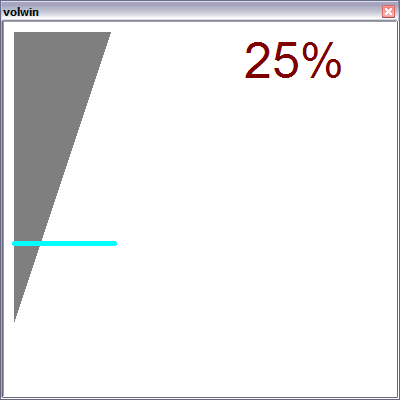
Bored and needed more practive in picwins.
Bleh, self explanatory.
Thanks to BlueThen, i stole his picwin styles, sorry:P x
menu * {
  Volume: volwin
}
alias volwin {
  window -paoCzdk0 +tnbL @volwin -1 -1 400 400
  window -poCzdhk0 +tnbL @volwin.buf -1 -1 400 400
  .timervolwin 0 0 volwin.ini
  volwin.ini
}
alias volwin.ini {
  if (%sclick.vol) {
    if ($mouse.x >= 10 && $mouse.x <= 110 && $mouse.y >= 10 && $mouse.y <= 320) {
      set %vol.x $calc(300 - $mouse.y - 10)
    }
    if (vol.x) {
      vol -v $calc(%vol.x / 300 * 65535)
      unset %vol.x
    }
  }
  clear @volwin.buf
  drawrect -f @volwin.buf 14 14 10 10 100 300
  drawline @volwin.buf 0 120 170 10 40 400
  drawline @volwin.buf 11 5 10 $calc(300 - (($vol(master) / 65535 * 300) + 10)) 110 $calc(300 - (($vol(master) / 65535 * 300) + 10))
  drawtext @volwin.buf 5 Arial 50 240 10 $round($calc($vol(master) / 65535 * 100),0) $+ %
  drawcopy -m @volwin.buf 0 0 400 400 @volwin 0 0 400 400
}
on *:CLOSE:@volwin: {
  .timervolwin off
  window -c @volwin.buf
}
menu @volwin {
  sclick {
    set %sclick.vol 1
    .timerdragvol 0 0 volwin.ini
  }
  drop {
    unset %sclick.vol
    .timerdragvol off
  }
}

EL, agreed, i think i\'ll make a smaller, more useful window. :P
BlueThen, i was lazy at the time, lol, i\'ll edit to channel/menu w/e :D
Hawkee, will do after i post this comment.
I\'m not sure what\'s up with the calculations atm, and the disappearing at the end. prolly a calc error there too, hehe. okay, i\'ll make a v2 soonish :D

Delightful :)
A few things:
A- What about adjusting wave, midi, song, AND master volumes? (checkboxes/buttons(?))
B- Mute button/checkbox/option
C- When I open up the picwin (if on 100% volume) it displays 100%; however, after adjusting it again, it only displays the maximum volume as 93%.. perhaps a calculation error?
Good luck on this! I really do enjoy the idea and it\'d be an interesting addition to say.. an mp3 player? :P

Nais!
I suggest that you shouldn\'t use
on menu:*:
because people tend to get really mad when they find a link to their script everywhere. I personally only have hte menu on the channel and status.
Also, a good tip, is that you should have the buffer atleast twice the size as the actual window. Indeed it might make calculating a little harder, but the output is good because it\'s pretty much anti-aliasing.