 By Jonesy44 on Jan 23, 2009
Realised i didn't have one, so i made one.
Version 1.5
Command is /aw [awaymsg] to open the dialog. any additions or bugs? post.
Screenshot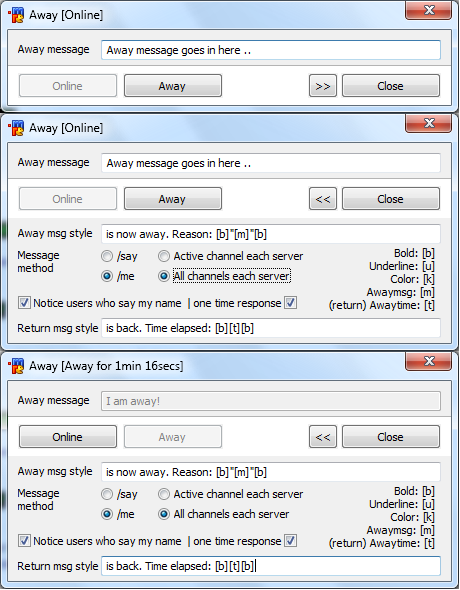
image (not mandatory, but looks nicer)
Save the image to your mircdirectory [//run $mircdir]
menu * {
Away Manager:aw
}
alias aw { dialog $iif($dialog(xaway),-v,-m)) xaway xaway | if ($1 && !$away) { did -ra xaway 301 $1- } | halt }
dialog xaway {
size -1 -1 443 75
option pixels
title Away $+([,$iif($away,Away for $duration($awaytime),Online),])
; -- REMOVE THE COMMENT ";" FROM THE NEXT LINE IF YOU HAVE THE IMAGE
; -- IF YOU DON'T, LEAVE THE COMMENT, OR DELETE THIS BLOCK
;icon 1, 0 35 443 40, bottom.png, noborder actual
; -- ##############
; -- ##############
button "Online", 101, 10 43 100 25
button "Away", 102, 115 43 100 25
button "Close", 103, 333 43 100 25
button "Set new message styles", 104, 10 43 205 25
button ">>", 105, 300 43 30 25
text "Away message", 201, 10 12 80 20
text "Away msg style", 202, 10 83 80 20
text "Message method", 203, 10 105 80 30
text "Return msg style", 204, 10 178 85 20
edit $awaymsg, 301, 93 10 340 20, autohs
edit %away.msgstyle, 302, 93 81 340 20, autohs
radio "/say", 303, 93 103 50 20, group
radio "/me", 304, 93 123 50 20
edit %away.rmsgstyle, 305, 93 175 340 20, autohs
radio "Active channel each server", 306, 150 103 150 20, group
radio "All channels each server", 307, 150 123 150 20
check "Notice users who say my name", 308, 10 150 170 20
check "| one time response", 309, 179 150 110 20, left
text Bold: [b] $+ $crlf $+ Underline: [u] $+ $crlf $+ Color: [k] $+ $crlf $+ Awaymsg: [m] $+ $crlf $+ (return) Awaytime: [t], 1001, 298 103 130 70, right
}
on *:dialog:xaway:init:*: { away.u | .timeraway 0 1 away.u | did -c $dname $iif(%away.msgsetting == me,304,303) | did -h $dname 104 | did -f $dname 301 | did -c $dname $iif(%away.serversetting == 1,306,307)
if (%away.notice) { did -c $dname 308 }
else { did -b $dname 309 }
if (%away.notice.once) { did -c $dname 309 }
}
on *:dialog:xaway:close:*: { .timeraway* off }
on *:dialog:xaway:edit:*: {
if ($did == 302 || $did == 305) {
if ($did(302) != %away.msgstyle || $did(305) != %away.rmsgstyle) { did -v $dname 104 | did -h $dname 101,102 }
else { did -h $dname 104 | did -v $dname 101,102 }
}
}
on *:dialog:xaway:sclick:*: {
if ($did == 101) {
did -b $dname 101,102
var %x = 1
while (%x <= $scon(0)) {
scid $scon(%x)
$+(away,%away.msgsetting) $replace(%away.rmsgstyle,[b],,[u], ,[k],,[m],$iif($awaymsg,$v1,n/a),[t],$duration($awaytime))
away
inc %x
}
.remove away.temp
}
elseif ($did == 102) {
did -b $dname 101,102
var %x = 1
while (%x <= $scon(0)) {
scid $scon(%x)
$+(away,%away.msgsetting) $replace(%away.msgstyle,[b],,[u], ,[k],,[m],$iif($did(301),$v1,n/a))
away $iif($did(301),$v1,n/a)
inc %x
}
}
if ($did == 103) { dialog -x $dname | .timeraway* off | halt }
elseif ($did == 104) { set %away.msgstyle $did(302) | set %away.rmsgstyle $did(305) | did -h $dname 104 | did -v $dname 101,102 }
elseif ($did == 105) {
if ($did(105) == >>) { dialog -s $dname -1 -1 443 200 | did -ra $dname 105 << }
else { dialog -s $dname -1 -1 443 75 | did -ra $dname 105 >> }
}
elseif ($did == 303) { set %away.msgsetting say }
elseif ($did == 304) { set %away.msgsetting me }
elseif ($did == 306) { set %away.serversetting 1 }
elseif ($did == 307) { set %away.serversetting 2 }
elseif ($did == 308) {
if (!$did(308).state) { did -b $dname 309 | set %away.notice 0 }
else { did -e $dname 309 | set %away.notice 1 }
}
elseif ($did == 309) {
if ($did(309).state) { set %away.notice.once 1 }
else { set %away.notice.once 0 }
}
away.u
}
alias away.u {
did $iif(!$away,-b,-e) xaway 101
did $iif($away,-b,-e) xaway 102,301
dialog -t xaway Away $+([,$iif($away,Away for $duration($awaytime),Online),])
}
alias awayme { $iif(%away.serversetting == 2,ame,describe $active) $1- }
alias awaysay { $iif(%away.serversetting == 2,amsg,msg $active) $1- }
on *:text:*:#: {
if ($me isin $1- && %away.notice && $away) {
if (%away.notice.once) {
if (!$read(away.temp,s,$nick)) { notice $nick I am currently away. Reason: $qt($awaymsg) $+ . I have been away for $duration($awaytime) (one time response) | write away.temp $nick $+([,$time,]) $1- }
halt
}
else { notice $nick I am currently away. Reason: $qt($awaymsg) $+ . I have been away for $duration($awaytime) | write away.temp $nick $+([,$time,]) $1- }
}
}
on *:connect: {
scid $scon(1)
var %a = $awaymsg
if ($away) { scid -r | away $iif(%a,$v1,n/a) }
}

Hey Jonesy, It's nice Script I like it. but if you could add something like Adding Auto Away Function of course you should add on and off for it, also something like for each Server and Room, Like You can only enable the Script on one Server and specific room or active room. if you got what I mean :D
Thank you.
Rated : 7 / 10
Liked Button : Clicked

Well I tried it again today and now it is something different altogether. What was wrong before was I was not entering a message style. Now that I have, however, the buttons gray as they should and the status informs me when I am marked as away and online, however my away message is not displayed in the channels I am in. I copied your text in the screenshots verbatim. There are no errors in the status window O.o
Thanks for the prompt reply.