 By Jonesy44 on Nov 30, 2008
This script can be added to a website to check if a port on a specified website/ip is open or not. my use for this was for checking with my uTorrent port.
In basic, if a socket is openned, it has connected. If it times out (2-3 seconds) it fails. You can edit the timeout in the fsockopen line, the last paramater is the timeout in seconds
Tested in Firefox. Report any bugs. Feel free to use wherever you need it.
[size=20]Can now scan a range of ports![/size]
Warning: A wide range of ports WILL take a long time to load the page.
Screenshot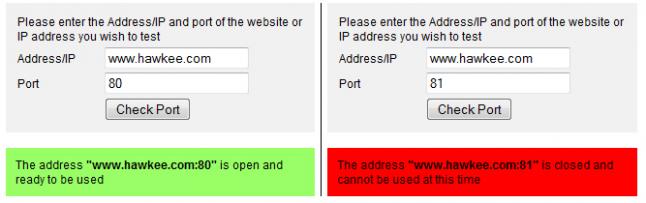
This script has been featured on the following websites with thanks to the wonders of google.
http://pallz.net/port.php
http://www.dunton-green.co.uk/kentinternet/port.php
http://sgnews.totalh.com/portChecker.php
http://www.kmcnally.net/stuff/port.php
http://dm-gwi.co.cc/Parsers/RandomCrap.php
http://x10hosting.com/forums/scripts-3rd-party-apps/100490-php-portcheck.html
<?php
/* Port Checking PHP Script
Created by Jonesy44
Released: 30 November, 2008 */
echo '<title>Port Availability Checker';
//Please leave the next line :)
echo ', Writen by Jonesy44';
echo '</title>';
$addr = $_SERVER["REMOTE_ADDR"];
$port = "80";
if ($_GET["addr"]) {
$addr = $_GET["addr"];
}
if ($_GET["port"]) {
$port = $_GET["port"];
}
if ($_GET["port2"]) {
$port2 = $_GET["port2"];
}
echo '<form action="' .$_SERVER["PHP_SELF"]. '" method="get">
<div style="width:300px;background:#f1f1f1;padding:10px;font-family:arial;">
<table width="100%" border="0" cellspacing="0" cellpadding="2">
<tr>
<td colspan="2" style="font-size:12px;">Please enter the Address/IP and port of the website or IP address you wish to test (enter the second IP if you want so scan to that port range)</td>
</tr>
<tr>
<td width="30%" style="font-size:12px;">Address/IP</td>
<td width="80%"><input type="text" name="addr" value="' .$addr. '"></td>
</tr>
<tr>
<td width="30%" style="font-size:12px;">Port</td>
<td width="80%"><input type="text" name="port" value="' .$port. '"></td>
</tr>
<tr>
<td width="30%" style="font-size:12px;">-</td>
<td width="80%"><input type="text" name="port2" value="' .$port2. '"></td>
</tr>
<td width="30%"> </td>
<td width="80%"><input type="submit" value="Check/Scan Port(s)"></td>
</tr>
</table>
</div>
</form>
';
if ($_GET["addr"]) {
if ($_GET["port"] && !$_GET["port2"]) {
$fp = @fsockopen($addr, $port, $errno, $errstr, 2);
$success = "#FF0000";
$success_msg = "is closed and cannot be used at this time";
if ($fp) {
$success = "#99FF66";
$success_msg = "is open and ready to be used";
}
@fclose($fp);
echo '<div style="width:300px;background:' .$success. ';padding:10px;font-family:arial;font-size:12px;">
The address <b>"' .$addr. ':' .$port. '"</b> ' .$success_msg. '
</div>';
}
  else if ($_GET["port"] && $_GET["port2"]) {
    $p1 = $_GET["port"];
    $p2 = $_GET["port2"];
    if ($p1 == $p2) {
      $fp = @fsockopen($addr, $port, $errno, $errstr, 2);
$success = "#FF0000";
$success_msg = "is closed and cannot be used at this time";
if ($fp) {
$success = "#99FF66";
$success_msg = "is open and ready to be used";
}
@fclose($fp);
echo '<div style="width:300px;background:' .$success. ';padding:10px;font-family:arial;font-size:12px;">
The address <b>"' .$addr. ':' .$port. '"</b> ' .$success_msg. '
</div>';
}
else {
if ($p1 < $p2) {
$s = $p1;
$st = $p1;
$e = $p2;
}
else if ($p2 < $p1) {
$s = $p2;
$st = $p2;
$e = $p1;
}
while ($s <= $e) {
$fp = @fsockopen($addr, $s, $errno, $errstr, 1);
if ($fp) {
$p_open = $p_open. " " .$s;
$p_1 = 1;
}
@fclose($fp);
$s++;
}
if ($p_1) {
$c = "#99FF66";
$m = "On the address <b>" .$addr. "</b> and port range <b>" .$st. "-" .$e. "</b> the following ports were open: " .$p_open;
}
else {
$c = "#FF0000";
$m = "No ports on the address <b>" .$addr. "</b> and port range <b>" .$st. "-" .$e. "</b> were open";
}
echo '<div style="width:300px;background:' .$c. ';padding:10px;font-family:arial;font-size:12px;">' .$m. '</div>';
}
}
}
?>

or this.. http://www.sensoria.in/TU/innovation-center/36/214.html .. i had no idea ripping was so bad..
AND THERE'S MORE.. http://canyoucount.vndv.com/countsportchecker.php
This script has been featured on the following websites with thanks to the wonders of google.
http://pallz.net/port.php
http://www.dunton-green.co.uk/kentinternet/port.php
http://sgnews.totalh.com/portChecker.php
http://www.kmcnally.net/stuff/port.php
http://dm-gwi.co.cc/Parsers/RandomCrap.php
http://x10hosting.com/forums/scripts-3rd-party-apps/100490-php-portcheck.html
Woo =]

@Night: "not based on NAT"
I'm afraid it's going to be a long time before that happens.
"IPv6 via tunnel."
http://www.google.com/intl/en/ipv6/faq.html#tunnel
Depends on if you want to run in an environment you're not comfortable with, IPv6 doesn't need to be used for a few more years atleast. Lets wait for Windows. 8?
Dunno who the owner of that site is @Jonsey44, WHOIS doesn't return anything special.
So you know, IPv4 (What we, and you use currently) can only allocate 2^32, including reserved addresses that we can't use. That is roughly 4 billion, obviously not enough for the growing world. It is possible by 2013 it will be exhausted.
IPv6, which is partially in support (Google, and some sites /torrents and most Linux distributions) but there is yet still a huge leap to take to fulfill this jump.
IPv6 = 2¹²⁸ = A lot.
@Night. No, there will be enough addresses maybe to allow every partical in this universe internet allocations, but.. pointless to go there. :)
its HEX
so a-f and 0-9
8 sets off 4s
so 0000:0000:0000:0000:0000:0000:0000:0000 - ffff:ffff:ffff:ffff:ffff:ffff:ffff:ffff
it can also be shorten down. like 0000 is written like this ::
so 0000:0000:0000:0000:0000:0000:0000:0000 is realy :: in short format
to put that in on a real ip context
2001:470:dc100::100
is short for 2001:0470:dc100:0000:0000:0000:0000:0100
so a zero at a start can be removed withouut adding a :
a full sets off 0 in a line 00000 is ::
:: can only be used onces so ::: is invalid
if you want to test ipv6 you can get a free tunnel from http://tunnelbroker.net/
(IPv6 in hex gives enough ips to every corn off sand ine the world, had it been a-z it would be every atom in the universe)
Being able to scan other IPs is infact a function which i wanted included on there. The auto print of the IP is because the majority of people who visit those types of websites are checking their own network. If you only want to be able to check your own, you could change into plain text removing the ability to edit entirely.
I've never come accross ipv6 before i'm sorry. what is the range per section? a-z0-9?
a few litte things that would be good.
Dont print ip in url so that i can mod it to only scan port like
then it checks the remote_addr and prints out.
now it gives ip which gives the end user ability to scan others, which is a unwatned effect.
2nd
for ipv6
have it check the inputet add is ipv6
if so add []
bez to define a port in ipv6 it has to be in []
like 2001:470:dc100::100
is a valid ipv6
to define a port in there has to be like this [2001:470:dc46::2]:port
now when enter a straigt v6 it just adds the : at the end which is not a port but rather a new address lengt.
else if ($_GET["port"] && $_GET["port2"]) {
$p1 = $_GET["port"];
$p2 = $_GET["port2"];
if ($p1 == $p2) {
$fp = @fsockopen($addr, $port, $errno, $errstr, 2);
sorry, but where is $port set?
should check to see if $_GET['port'] and $_GET['port2'] is numeric
if (is_numeric($_GET['port']) && is_numeric($_GET['port2'])) {
besides that, not bad....
Thanks for the replies, i try and keep a clean interface, Hawkee. and yes, possibly a bad habit of integrating HTML with PHP, but i find it sometimes easier to maintain rather than using the two seperately.
I will see what i can do FURBY, might take a while to scan the ports, so perhaps some nice JS & Ajax will come in handy to make a nicer interface.
Thanks for the ratings & +Likes :]