 By eqrunner on May 08, 2012
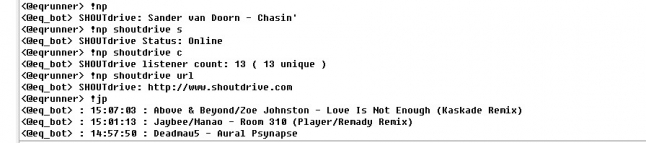
Now Playing script for internet radio stations. It uses a SHOUTcast admin page for a given station.
Just Played. Will show up to the last 9 songs played on the given station.
Commands:
!np or !nowplaying will show current song
!np [station name] [c,count,l,listner]
Shows current listner count.
!np [station name] url
will show the url of said site.
!np [station name] status
will show the current status of the stream [Online or Offline]
!jp or !justplayed or !lp or !lastplayed will show previous 3 songs
!jp [1-9]
will show previous 1 or up to 9 previous songs. Default settings allow normal/voice to call up to 5 previous songs. Op/Owners can call up all 9 previous songs. Flood protection is added in to keep a user from calling up the history list more than once in a short period of time.
!np [help]
Code may look long and complicated, I just have added a lot of notes and comments for future modifications and so I remember what I did.
See bottom of script for Version history
==========
;;;;;;;;;;;;;;;;;;;;;;;;;;;;;;;;;;;;;;;;;;;;;;;;;;;;;;;;;;;;;;;;;;;;;;;;;;;;;;;;;;;;;;;;;;;;;;;;;;;;;;;;;;;
;; Now Playing ;;;;;;;;;;;;via SHOUTcast ;;;;;;;;;;;;;;;;;;;;;;;;;;;;;;;;;;;;;;;;;;;;;;;;;;;;;;;;;;;;;;;;;;
;;;;;;;;;;ft JustPlayed;;;;;;;;;;;;;;;;;;;;;;;;;;;;;;;;;;;;;;eqrunner;;;;;;;;;;;;v 3.0;;;;;;;;;;;;;;;;;;;;;

/*
!nowplaying
!nowplaying [station name] [s|c|L]
!nowplaying [help|?]
!justplayed
!justplayed [1-9]

*/

;alias np {
on $*:TEXT:/^[!](nowplaying|np|justplayed|jp|justheard|lastplayed|lastplay|lp|previous|previousplay|previousplayed|history|played)/Si:#:{

  ;=== Set up the station Information: ===
  set %np_station SHOUTdrive
  set %np_ip sanjose.oontz.shoutdrive.com
  set %np_port 80
  set %np_url http://www.shoutdrive.com
  ;=== End station Information ===

  ; === Nothing below needs to be modified, unless you wish to modify the output, in which case, go down to the sockclose alias. ===

  set %np_nick $nick
  set %np_chan $chan
  set %np_network $network

  ;-- Merges multiple commands down to two commands !nowplaying and !justplayed --;
  ;- Nowplaying merge
  var %np_np_list !nowplaying !np
  if ($1 isin %np_np_list) set %np_command !nowplaying
  ;- Justplayed merge
  var %np_jp_list !justplayed !jp !justheard !lastplayed !lastplay !lp !previous !previousplay !previousplayed !played !history
  if ($1 isin %np_jp_list) set %np_command !justplayed

  ;--- Help Parameters
  if ($2 == ?) || ($2 == help) { nowplaying_help | halt }

  ;--- !nowplaying Parameters ---
  if (%np_command == !nowplaying) {
    set %np_sock_GET /7.html HTTP/1.0
  }

  ;--- Variable $3 Parameters ---
  if ($3 != $null) {
    if ($3 == s) || ($3 == status) set %np_3 status
    if ($3 == url) set %np_3 url
    if ($3 == c) || ($3 == count) || ($3 == listner) || ($3 == l) set %np_3 count
  }

  ;--- !justplayed Parameters ---
  ;- Limits voice and normal to only seeing a max of 5. Allows OPS a max of 10 --
  ;-- Helps prevent standard user flooding
  ;- IF no number is givin, then set to the default amount of 3

  if (%np_command == !justplayed) {
    set %np_sock_GET /played.html HTTP/1.0
    if ($2 isnum 1-9) {
      var %np_oplist isop ishop isowner
      if (%np_nick isop %np_chan) || (%np_nick isowner %np_chan) {
        set %np_2 $2
      }
      if (%np_nick isvoice %np_chan) || (%np_nick isreg %np_chan) {
        if ($2 > 5) { set %np_2 5 }
        if ($2 <= 5) { set %np_2 $2 }

      }
    }
    if ($2 == $null) { set %np_2 3 }
  }

  ;--- Flood Protection
  if (%np_command == !justplayed) && (%npdelay > 0) { .notice $nick Previous songs already listed. See above. | unset %np_* | halt }

  ;--- Socket Preperation
  sockclose nowplaying
  sockopen nowplaying %np_ip %np_port
}

;========== SOCK OPEN ==========

on *:SOCKOPEN:nowplaying:{
  sockwrite -n $sockname GET %np_sock_GET
  sockwrite -n $sockname User-Agent: Mozilla
  sockwrite -n $sockname $crlf
}

;========== SOCK READ ==========

on *:sockread:nowplaying:{
  ;--- !nowplaying Sock Read ----
  if (%np_command == !nowplaying) {
    if ($sockerr > 0) {
      notice %np_nick %tegn.1 $+ %radio.navn $+ %tegn.2 %tegn.midt %tegn.1 Stream Is Offline %tegn.2 NOTE1
      return
    }
    :nextread
    sockread -f %scasttemp1
    if ($sockbr == 0) return
    if (%scasttemp1 == $null) %scasttemp1 = empty
    set %scasttemp1 $remove(%scasttemp1,<HTML><meta http-equiv="Pragma" content="no-cache"></head><body>,</body></html>)
    if ((HTTP/1.* !iswm %scasttemp1) && (content-type* !iswm %scasttemp1) && (%scasttemp1 != empty)) {
      set %np_listeners1 $gettok(%scasttemp1,1,44)
      set %np_status1 $gettok(%scasttemp1,2,44)
      set %np_peak1 $gettok(%scasttemp1,3,44)
      set %np_max1 $gettok(%scasttemp1,4,44)
      set %np_ulistners1 $gettok(%scasttemp1,5,44)
      set %np_kbps $gettok(%scasttemp1,6,44)
      set %np_asong1 $gettok(%scasttemp1,7-,44)
      set %np_song1 $replace(%np_asong1,&,$chr(38),',$chr(39))
    }
    goto nextread
  }
  ;--- !justplayed Sock Read ----
  if (%np_command == !justplayed) {
    sockread -f %jp_temp
    if ($regex(%jp_temp,/(?i)<td>(.+)<\/td>/)) {
      ;echo -s $regml(1)

      ;--- Strips down the code
      /*
      Strips down the code down to the needed info with § seperators to be
      used by the $gettok.
      Yes, I could of combined this in to one or two lines. But I kept it
      seperate to help keep it understandable and easy to trouble shoot.
      -Removes all close tags in the code </*>
      -Removes all <tr> and <b> tags from the code
      -Replaces all <td> and <br> with § character
      -Counts total § characters to be referenced below in the while loop.
      */
      var %jp_stripped $regsubex($regml(1),/</[^>]*>/g,$chr(0))
      var %jp_stripped $replace(%jp_stripped,<tr>,$chr(0),<b>,$chr(0))
      var %jp_stripped $replace(%jp_stripped,<td>,$chr(167),<br>,$chr(167))
      set %jp_167count $count(%jp_stripped,$chr(167))

      ;----Sets the first song (current song)
      /*
      Have to as the 'Current song' at the end, screws up
      the count for the remainder. (Song 1 time and song is at 3 and 4 (odd then even), as
      the rest are at 6 and 7 (even than odd)
      */
      set %jp_time1 $gettok(%jp_stripped,3,167)
      set %jp_song1 $gettok(%jp_stripped,4,167)
      var %jp_line_var = 6
      var %jp_songline_var = 2

      ;---Sets the remainder of the songs, plus extra junk.
      /*
      =While the line_var is less than the total number of § characters
      -Sets the time variable
      -Increases the token count number
      -Sets the Song Varible
      -Increases the token count and song line count
      */
      while (%jp_line_var < %jp_167count) {
        set $+(%,jp_time,%jp_songline_var) $gettok(%jp_stripped,%jp_line_var,167)
        inc %jp_line_var
        set $+(%,jp_song,%jp_songline_var) $gettok(%jp_stripped,%jp_line_var,167)
        inc %jp_line_var
        inc %jp_songline_var
      }
      ;set %jp_stripped3 $regsubex($regml(1),/§[^>]*§/g,$chr(167))
    }
  }
}

;========== SOCK CLOSE ==========

on *:sockclose:nowplaying:{
  ;=== Station Fail ====
  ;-- If station is offline then:
  if (%np_status1 == 0) {
    msg %np_chan %np_station $+ : Stream Is Offline
    goto np_end
  }

  ;=== User had added a 3rd parameter to their message. Aka !nowplaying [station] [s,status,url,c,count,listern]
  ;-- If user has added an S or Status as the 3rd parameter. Then the status of station will show.
  if (%np_3 == status) {
    if (%np_status1 == 0) { var %np_status2 = Offline }
    elseif (%np_status1 == 1) { var %np_status2 = Online }
    msg %np_chan %np_station Status: %np_status2
    ;msg %np_chan %np_station Status: %np_status2 $chr(124) Listeners: %np_listeners1 $chr(124) Peak: %np_peak1 $chr(124) Limit: $+ %np_max1 $chr(124) Stream: $+ %np_kbps $+ kbps
  }

  ;-- If user has URL as 3rd parameter, then url of site will show.
  if (%np_3 == url) {
    msg %np_chan %np_station $+ : %np_url
  }

  ;-- If user has C, Count, or L, then listener count will show.
  if (%np_3 == count) {
    msg %np_chan %np_station listener count: %np_listeners1 ( %np_ulistners1 unique )
  }

  ;-- IF user has only asked for !np, or !np [station], then the current song will show.
  if (%np_3 == $null) {
    ;--- IF !nowplaying
    if (%np_command == !nowplaying) {
      msg %np_chan %np_station $+ : %np_song1
    }
    ;--- IF !justplayed
    if (%np_command == !justplayed) {
      inc -z %npdelay $calc(%np_2 * 10)
      var %jp_t = 1
      var %jp_list2_var = 2
      while (%jp_t <= %np_2) {
        .timer 1 %jp_t msg %np_chan %jp_list_var : $($+(%,jp_time,%jp_list2_var),2) : $($+(%,jp_song,%jp_list2_var),2)
        inc %jp_t
        inc %jp_list2_var
      }
    }
  }
  :np_end
  unset %np_*
  unset %jp_*
}

;============================
;=== Help Section ===========
;============================

alias nowplaying_help {
  .timer 1 0 .msg %np_nick --- Now Playing HELP ---
  .timer 1 1 .msg %np_nick Use command: !nowplaying to see what is currently playing.
  .timer 1 3 .msg %np_nick Use commands: !justplayed or !lastplayed to see the previous 3 songs
  .timer 1 4 .msg %np_nick You can add a number on the end to see a specific amount of previous songs. Limit 5 for users, 10 for ops
  .timer 1 5 .msg %np_nick EX: !justplayed 5 = will give you previous 5 songs.
  .timer 1 6 .msg %np_nick --- END of Now Playing Help ---
  %np_tunage_cleanup
}

/*
====================================
v 2.1 Released to public. Fully working Nowplaying
v 3.0 Rewrittin, Now includes Playlist history and HELP
====================================

Notes:
Two actions read from seperate pages, but use the same common SOCKOPEN/SOCKREAD.
!nowplaying GET's from /7.html
!justplayed GET's from /played.html
*/

@DragonHeart version 3.0 posted. It now includes !justplaying script.
Let me know if there are any bugs in it.
@DragonHeart I did once in the past. And I am not sure where it is at the moment. (Gonna have to dig through my files) Thou I do recall, it uses the admin.cgi data page which requires a server user name and password.
Do you operate the server you want the song history for, or is it someone elses? If its some one elses, I will have try and create one for the public song history page, which may be a few as my schedule is busy.
@Yawhatnever Line 68 is ment to be commented out. It is a detailed 'status' giving you all the stats on the station. vs line 67 which only tells you if the station is online or offline.
and yes, on line 33, it has been corrected to %np_nick. I have had made this script years ago, but finally got around to posting it. So I may of messed up a few areas. Let me know if you find anything else.





First off. I would recommend putting this script in a separate script file. (Script Editor/ Remote Tab/ File- New- Script/ File - Save As- nowplaying.ini)
This way it will remove any chances of another script interfering.
Second. If you copy/pasted it and tested it. Then it would of failed, as the test server I had in the script had recently become outdated. I just now (Jun 06 2013) have updated the script with the updated server.
set %np_ip sanjose.oontz.shoutdrive.com
Try copy/pasting again. And let me know if it still fails.