 By Savage_CL on Dec 27, 2011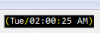
Simple script which puts your timestamp in your toolbar.
Commands are /startclock and /stopclock
Screenshot is of my own personal timestamp being used.
EDIT: uses your background color, so you shouldn't have any issues seeing it.
on *:LOAD:{
  set %clock.on.start $input(Would you like the clock to start at startup?,yw,Toolbar Clock)
}
on *:START:{
  if (%clock.on.start) { startclock }
}
alias startclock {
  window -pBw0hf  +d @clock -1 -1 $calc($width($timestamp,consolas,12,0,1) + 2) 18
  drawrect -nf @clock $color(background) 1 0 0 $calc($width($timestamp,consolas,12,0,1) + 2) 18
  drawtext -p @clock 0 consolas 12 1 1 $timestamp
  if (!$toolbar(clock)) { toolbar -au clock "Clock" @clock }
  .timerclock 0 1 clock.cont
}
alias clock.cont {
  window -pBw0hf  +d @clock -1 -1 $calc($width($timestamp,consolas,12,0,1) + 2) 18
  drawrect -nf @clock $color(background) 1 0 0 $calc($width($timestamp,consolas,12,0,1) + 2) 18
  drawtext -p @clock 0 consolas 12 1 1 $timestamp
  toolbar -up clock @clock
}
alias stopclock {
  .timerclock off
  toolbar -d clock
  close -@ @clock
}

All I am getting is a white rectangle. I am using version 6.35.
By the way I use background color of white.
I changed "consolas" to "Fixedsys" and the "$color(background)" to "$color(notice)" and it shows on mine now.
alias startclock {
  var %color 2.3.5.6.7.10.12
  window -pBw0hf  +d @clock -1 -1 $calc($width($time(h:nn:ss TT),Fixedsys,20,0,1) + 2) 18
  drawrect -nf @clock 0 1 0 0 $calc($width($time(h:nn:ss TT),Fixedsys,20,0,1) + 2) 18
  drawtext -p @clock $gettok(%color,$r(1,7),46) Fixedsys 12 1 1 $time(h:nn:ss TT)
  if (!$toolbar(clock)) { toolbar -au clock "Clock" @clock }
  toolbar -t Clock $day
  .timerclock 0 1 clock.cont
}
alias clock.cont {
  var %color 2.3.5.6.7.10.12
  window -pBw0hf  +d @clock -1 -1 $calc($width($time(h:nn:ss TT),Fixedsys,20,0,1) + 2) 18
  drawrect -nf @clock 0 1 0 0 $calc($width($time(h:nn:ss TT),Fixedsys,20,0,1) + 2) 18
  drawtext -p @clock $gettok(%color,$r(1,7),46) Fixedsys 12 1 1 $time(h:nn:ss TT)
  toolbar -up clock @clock
}
alias stopclock {
  .timerclock off
  close -@ @clock
  toolbar -d clock
}
The above is my version of it. The time changes colors every second. There is a popup that tells you the day when you hover your mouse over it.