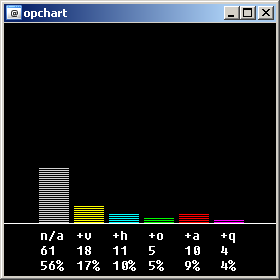
This thinggy here will do the following:
it's a bit pointless, but it looks nice ;_)
use either the popup menu from any channel window, or type /opchart #channel
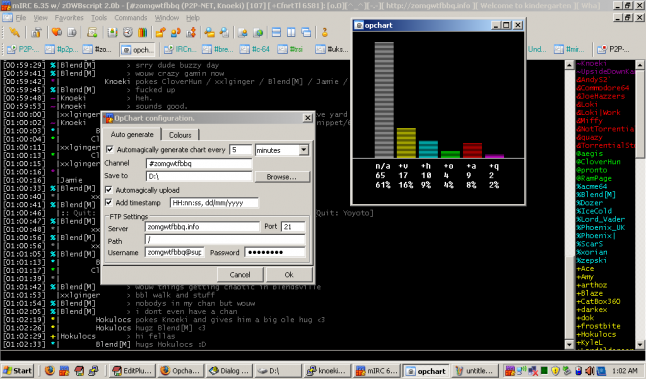
alright, a lot of stuff has been added.
first of all, I added a configuration dialog. try typing /opchart conf (or config, options, or similar things ;_)). Here you have 2 tabs, one to change the colours for the bars, and one to change auto-generation/upload settings.
I've also made it so that the bars are a bit longer, and you may notice they progressively build up. I actually wanted to make it so they do it all at the same time, so they're "racing", but I can't think of a satisfying idea... ideas are welcome.
Oh, and, if you autogenerate, it'll do that in the background, and will not animate the bars to speed up the process a bit ;_)
I've tested it, of course, but as always, some bug might have slipped in while I wasn't looking, so feedback is welcome.
Thanks to BlueThen for the autoupload idea. :_)
version history:
v1.0 - initial release + massive update
v1.0.1 - colours didn't get saved before in some cases, fixed.
on *:START: {
    var %oc.ini $scriptdiropchart.ini
    set %oc.version 1.0.1
    if ($readini(%oc.ini, autogen, enable) == 1) {
        .timeropchart 0 $readini(%oc.ini, autogen, interval) opchart $readini(%oc.ini, autogen, channel) autogen
    }
}

on *:LOAD: {
    var %oc.ini $scriptdiropchart.ini
    if ($file(%oc.ini) == $null) {
        echo -a opchart.ini not found, generating defaults... .. .
        writeini $qt(%oc.ini) autogen port 21
        writeini $qt(%oc.ini) autogen remote.path /
        writeini $qt(%oc.ini) autogen timestamp.format HH:nn:ss, dd/mm/yyyy
        writeini $qt(%oc.ini) colour regular 15
        writeini $qt(%oc.ini) colour voiced 8
        writeini $qt(%oc.ini) colour halfop 11
        writeini $qt(%oc.ini) colour operator 9
        writeini $qt(%oc.ini) colour superop 4
        writeini $qt(%oc.ini) colour owner 13
        writeini $qt(%oc.ini) colour background 1
        writeini $qt(%oc.ini) colour text 0
    }
    echo -a OpChart $+(v,%oc.version) by Knoeki.
}

alias opchart {
    var %oc.ini $scriptdiropchart.ini
    if ($1 isin conf,config,settings,options) {
        dialog -m opchart_conf opchart_conf
    }
    elseif (($1 != $null) && ($me ison $1)) {
        window $+(-dak0p,$iif($2 == autogen, h)) @opchart -1 -1 280 300
        drawfill @opchart $readini(%oc.ini, colour, background) $readini(%oc.ini, colour, background) 1 1
        var %target $1
        var %count 1
        var %total $nick($1, 0)
        while (%count <= %total) {
            inc %oc.group. [ $+ [ $modenum(%target, %count) ] ]
            inc %count
        }
        drawline @opchart 0 1 0 200 280 200
        var %count 1
        while (%count <= 6) {
            var %count.sub 1
            var %colour $gettok($readini(%oc.ini, colour, regular) $readini(%oc.ini, colour, voiced) $readini(%oc.ini, colour, halfop) $readini(%oc.ini, colour, operator) $readini(%oc.ini, colour, superop) $readini(%oc.ini, colour, owner), %count, 32)
            while (%count.sub <= $calc($perc(%oc.group. [ $+ [ %count ] ], %total) * 3)) {
                drawrect -f @opchart %colour 1 $calc(%count * 35) $calc(200 - %count.sub) 30 1
                inc %count.sub 2
                if ($2 != autogen) {
                    sleep 100
                }
            }
            inc %count
        }
        var %count 1
        while (%count <= 6) {
            if (%oc.group. [ $+ [ %count ] ] != $null) {
                drawtext @opchart $readini(%oc.ini, colour, text) fixedsys 12 $calc(%count * 36) 205 $replacex(%count, 1, n/a, 2, +v, 3, +h, 4, +o, 5, +a, 6, +q)
                drawtext @opchart $readini(%oc.ini, colour, text) fixedsys 12 $calc(%count * 36) 220 %oc.group. [ $+ [ %count ] ]
                drawtext @opchart $readini(%oc.ini, colour, text) fixedsys 12 $calc(%count * 36) 235 $+($perc(%oc.group. [ $+ [ %count ] ], %total), $(%))
            }
            inc %count
        }
        if ($2 == autogen) {
            if ($readini(%oc.ini, autogen, timestamp) == 1) {
                drawtext @opchart $readini(%oc.ini, colour, text) "lucida console" 9 1 265 Generated at $asctime($readini(%oc.ini, autogen, timestamp.format))
            }
            drawsave -b4 @opchart $qt($+($readini(%oc.ini, autogen, local.path),opchart.bmp))
            window -c @opchart
            if ($readini(%oc.ini, autogen, auto.upload) == 1) {
                run $qt($scriptdiropchart.bat)
            }
        }
    }
    else {
        echo -a You must specify a channel to generate the opchart for.
    }
    unset %oc.*
}

alias -l modenum {
    if ($left($nick($1, $2).pnick, 1) isin $(~&@%+)) {
        return $replace($left($nick($1, $2).pnick, 1), ~, 6, &, 5, @, 4, $(%), 3, +, 2)
    }
    else {
        return 1
    }
}

alias -l perc {
    return $round($calc(($1 / $2) * 100), 0)
}

alias -l sleep {
    var %x 1
    while (%x <= $1) {
        inc %x
    }
}

alias -l cname {
    if (($1 isnum) && ($1 <= 15)) {
        return $replace($1, 0, white, 1, black, 2, darkblue, 3, darkgreen, 4, red, 5, darkred, 6, purple, 7, orange, 8, yellow, 9, green, 10, teal, 11, turquoise, 12, blue, 13, pink, 14, darkgrey, 15, grey)
    }
    else {
        return $replace($1, white, 0, black, 1, darkblue, 2, darkgreen, 3, red, 4, darkred, 5, purple, 6, orange, 7, yellow, 8, green, 9, teal, 10, turquoise, 11, blue, 12, pink, 13, darkgrey, 14, grey, 15)
    }
}

menu channel {
   .zOWB
   ..Opchart:/opchart $active
}

dialog opchart_conf {
  title "Opchart settings"
  size -1 -1 168 126
  option dbu
  button "Cancel", 1, 91 113 37 12
  button "Ok", 2, 130 113 37 12
  tab "Auto generate", 3, 0 0 167 111
  check "Automagically generate chart every", 4, 3 15 97 10, tab 3
  edit "", 5, 100 15 20 10, tab 3 autohs
  combo 6, 121 15 44 11, tab 3 sort drop
  edit "", 7, 34 36 86 10, tab 3 autohs
  text "Save to", 8, 2 37 31 10, tab 3
  check "Automagically upload", 9, 2 47 62 10, tab 3
  edit "", 11, 141 76 21 10, tab 3 autohs
  edit "", 12, 33 76 93 10, tab 3 autohs
  text "Port", 13, 129 77 12 8, tab 3
  text "Server", 14, 5 79 25 8, tab 3
  text "Path", 15, 5 89 25 8, tab 3
  edit "", 16, 33 86 129 10, tab 3 autohs
  edit "", 17, 112 96 50 10, tab 3 pass autohs
  text "Password", 18, 86 98 25 8, tab 3
  edit "", 19, 33 96 49 10, tab 3 autohs
  text "Username", 20, 5 98 25 8, tab 3
  box "FTP Settings", 21, 2 69 163 41, tab 3
  button "Browse...", 22, 121 37 44 9, tab 3
  check "Add timestamp", 38, 2 57 50 10, tab 3
  edit "", 39, 53 57 72 10, tab 3 autohs
  edit "", 42, 34 26 86 10, tab 3 autohs
  text "Channel", 43, 2 27 25 8, tab 3
  tab "Colours", 23
  text "Regular", 24, 3 17 25 8, tab 23
  combo 25, 35 15 45 50, tab 23 drop
  combo 26, 35 26 45 50, tab 23 drop
  combo 27, 35 37 45 50, tab 23 drop
  combo 28, 35 48 45 50, tab 23 drop
  combo 29, 35 59 45 50, tab 23 drop
  combo 30, 35 70 45 50, tab 23 drop
  combo 31, 35 81 45 50, tab 23 drop
  combo 32, 35 92 45 50, tab 23 drop
  text "Owners", 40, 3 72 25 8, tab 23
  text "Superops", 41, 3 61 25 8, tab 23
  text "Operators", 33, 3 50 25 8, tab 23
  text "Halfops", 34, 3 39 25 8, tab 23
  text "Voiced", 35, 3 28 25 8, tab 23
  text "Background", 36, 3 83 29 8, tab 23
  text "Text", 37, 2 94 29 8, tab 23
}

on *:DIALOG:opchart_conf:sclick:22: {
    did -ra $dname 7 $sdir($scriptdir, Select default save dir)
}

on *:DIALOG:opchart_conf:sclick:1: {
    dialog -x $dname
}

on *:DIALOG:opchart_conf:sclick:2: {
    var %oc.ini $scriptdiropchart.ini
    writeini $qt(%oc.ini) autogen enable $did($dname, 4).state
    if ($did($dname, 4).state == 1) {
        writeini $qt(%oc.ini) autogen interval.unit $did($dname, 6, 0)
        if ($did($dname, 5).edited == $true) {
            if ($did($dname, 6, 0) == hours) {
                writeini $qt(%oc.ini) autogen interval $calc(($did($dname, 5) * 60) * 60)
            }
            elseif ($did($dname, 6, 0) == minutes) {
                writeini $qt(%oc.ini) autogen interval $calc($did($dname, 5) * 60)
            }
            else {
                writeini $qt(%oc.ini) autogen interval $did($dname, 5)
            }
            .timeropchart 0 $readini(%oc.ini, autogen, interval) opchart $readini(%oc.ini, autogen, channel) autogen
        }
        if ($did($dname, 7).edited == $true) {
            writeini $qt(%oc.ini) autogen local.path $did($dname, 7)
        }
        writeini $qt(%oc.ini) autogen auto.upload $did($dname, 9).state
        if ($did($dname, 9).state == 1) {
            if ($did($dname, 11).edited == $true) {
                writeini $qt(%oc.ini) autogen server $did($dname, 12)
            }
            if ($did($dname, 12).edited == $true) {
                writeini $qt(%oc.ini) autogen port $did($dname, 11)
            }
            if ($did($dname, 16).edited == $true) {
                writeini $qt(%oc.ini) autogen remote.path $did($dname, 16)
            }
            if ($did($dname, 17).edited == $true) {
                writeini $qt(%oc.ini) autogen ftp.pass $did($dname, 17)
            }
            if ($did($dname, 19).edited == $true) {
                writeini $qt(%oc.ini) autogen ftp.user $did($dname, 19)
            }
            writeini $qt(%oc.ini) autogen timestamp $did($dname, 38).state
            if ($did($dname, 39).edited == $true) {
                writeini $qt(%oc.ini) autogen timestamp.format $did($dname, 39)
            }
            if ($did($dname, 42).edited == $true) {
                writeini $qt(%oc.ini) autogen channel $did($dname, 42)
            }
            if ($file($scriptdiropchart.bat) != $null) {
                .remove $scriptdiropchart.bat
            }
            genbat
        }
    }
    var %boxes regular voiced halfop operator superop owner background text
    var %count 1
    while (%count <= 8) {
        writeini $qt(%oc.ini) colour $gettok(%boxes, %count, 32) $cname($did($dname, $calc(%count + 24), 0))
        inc %count
    }
    dialog -x $dname
}

on *:DIALOG:opchart_conf:sclick:4: {
    if ($did($dname, 4).state == 1) {
        did -e $dname 5-9,11-23,38,39,42,43
    }
    else {
        did -b $dname 5-9,11-23,38,39,42,43
    }
}

on *:DIALOG:opchart_conf:sclick:9: {
    if ($did($dname, 9).state == 1) {
        did -e $dname 11,12,16,17,19
    }
    else {
        did -b $dname 11,12,16,17,19
    }
}

on *:DIALOG:opchart_conf:init:0: {
    dialog -t $dname OpChart %oc.version configuration.
    set %oc.ini $scriptdiropchart.ini
    if ($readini(%oc.ini, autogen, enable) == 0) {
        did -u $dname 4
        did -b $dname 5,6,7,8,9,11,12,16,17,19,22,38,39,42
    }
    else {
        did -c $dname 4
    }
    var %count 1
    var %timeunits seconds minutes hours
    while (%count <= 3) {
        did -a $dname 6 $gettok(%timeunits, %count, 32)
        inc %count
    }
    if ($readini(%oc.ini, autogen, interval.unit) == seconds) {
        did -c $dname 6 3
        if ($readini(%oc.ini, autogen, interval) != $null) {
            did -a $dname 5 $readini(%oc.ini, autogen, interval)
        }
    }
    elseif ($readini(%oc.ini, autogen, interval.unit) == minutes) {
        did -c $dname 6 2
        if ($readini(%oc.ini, autogen, interval) != $null) {
            did -a $dname 5 $calc($readini(%oc.ini, autogen, interval) / 60)
        }
    }
    elseif ($readini(%oc.ini, autogen, interval.unit) == hours) {
        did -c $dname 6 1
        if ($readini(%oc.ini, autogen, interval) != $null) {
            did -a $dname 5 $calc(($readini(%oc.ini, autogen, interval) / 60) / 60)
        }
    }
    if ($readini(%oc.ini, autogen, local.path) != $null) {
        did -a $dname 7 $readini(%oc.ini, autogen, local.path)
    }
    if ($readini(%oc.ini, autogen, auto.upload) == 0) {
        did -u $dname 9
        did -b 11,12,16,17,19
    }
    else {
        did -c $dname 9
    }
    if ($readini(%oc.ini, autogen, server) != $null) {
        did -a $dname 12 $readini(%oc.ini, autogen, server)
    }
    if ($readini(%oc.ini, autogen, port) != $null) {
        did -a $dname 11 $readini(%oc.ini, autogen, port)
    }
    if ($readini(%oc.ini, autogen, remote.path) != $null) {
        did -a $dname 16 $readini(%oc.ini, autogen, remote.path)
    }
    if ($readini(%oc.ini, autogen, ftp.pass) != $null) {
        did -a $dname 17 $readini(%oc.ini, autogen, ftp.pass)
    }
    if ($readini(%oc.ini, autogen, ftp.user) != $null) {
        did -a $dname 19 $readini(%oc.ini, autogen, ftp.user)
    }
    if ($readini(%oc.ini, autogen, timestamp) != $null) {
        did $iif($readini(%oc.ini, autogen, timestamp) == 1, -c, -u) $dname 38
    }
    if ($readini(%oc.ini, autogen, timestamp.format) != $null) {
        did -a $dname 39 $readini(%oc.ini, autogen, timestamp.format)
    }
    var %count 1
    var %boxes regular voiced halfop operator superop owner background text
    var %colours white black darkblue darkgreen red darkred purple orange yellow green teal turquoise blue pink darkgrey grey
    while (%count <= 16) {
        var %sub.count 25
        while (%sub.count <= 32) {
            did -a $dname %sub.count $gettok(%colours, %count, 32)
            inc %sub.count
        }
        inc %count
    }
    var %count 1
    while (%count <= 8) {
        did -c $dname $calc(%count + 24) $calc($readini(%oc.ini, colour, $gettok(%boxes, %count, 32)) + 1)
        inc %count
    }
    if ($readini(%oc.ini, autogen, channel) != $null) {
        did -a $dname 42 $readini(%oc.ini, autogen, channel)
    }
}

alias -l genbat {
    var %oc.ini $scriptdiropchart.ini
    var %oc.bat $scriptdiropchart.bat
    write $qt(%oc.bat) goto skip
    write $qt(%oc.bat) OPEN $readini(%oc.ini, autogen, server)
    write $qt(%oc.bat) $readini(%oc.ini, autogen, ftp.user)
    write $qt(%oc.bat) $readini(%oc.ini, autogen, ftp.pass)
    write $qt(%oc.bat) BIN
    write $qt(%oc.bat) CD $readini(%oc.ini, autogen, remote.path)
    write $qt(%oc.bat) PUT $qt($+($readini(%oc.ini, autogen, local.path),opchart.bmp))
    write $qt(%oc.bat) QUIT
    write $qt(%oc.bat) :skip
    write $qt(%oc.bat) $(ftp -s:%0)
}
Alright, updated it... example:
http://zomgwtfbbq.info/opchart.bmp
(this should update every 5 minutes)
Thanks for the replies guys :_) I always like to hear what people think... just a shame that some of my stuff seems to get unnoticed due to other scripts :\
Slub77: No idea what you're talking about, sorry.
Sunslayer: yes, I know I can declare multiple variables on a line, but I prefer not to, it reads easier for me this way :_) No idea why the percentage is cut in half, you could try changing line 4 to:
window -dak0p @opchart -1 -1 280 290
BlueThen: good idea! :_) I might actually do that, throw it up on my site.
FordLawnmower: meh, no problem, I'll leave it here, at least it has some substance :p
Jethro: Yup, because as we all know, IRC is SERIOUS BUSINESS!!!!!111 ;_)

That makes no logical sense and it also directly contradicts the mIRC help file.
[Below from mIRC's help file]
Using brackets speeds up processing. If an alias uses too few brackets then the statement might be ambiguous and the alias will take longer to parse, might be parsed incorrectly, or might not be parsed at all.
The Start bracket { does tell msl that it's the start of the commands but it also says that it is the end of the if/while or whatever. Without the { msl will have to do several evaluations to determine the end of the if/while statement.
And as far as the end bracket } goes, unless you have a blank space after the end bracket, msl has to evaluate the last character anyway. How else could it find the end of the line?
"Excessive brackets" could slow a script down, but 1 set of { } in a if statement will Not.
Also, if you read the whole tutorial you will see that Yochai shows you to take long ugly single lines of code and break them down into several lines of properly bracketed code.
[A quote from Yochai's tutorial]
Alias com-chan { if ($1) { var %a = $comchan($1,0) | if (%a > 0) { while ($comchan($1,%a)) { .var %cc = $addtok(%cc, $comchan($1,%a), 44) | dec %a } echo $nick Common Channels: %cc } } | else { return } }
This looks like a mess, and in a few weeks it will be pretty hard to follow.
Here's a better way of scripting it:
Alias com-chan {
if ($1) {
var %a = $comchan($1,0)
If (%a > 0) {
while ($comchan($1,%a)) {
var %cc = $addtok(%cc, $comchan($1,%a), 44)
dec %a
}
echo $nick Common Channels: %cc
}
}
else { return }
}

- Don't use excessive Braces { } where you don't need them, and you only need them when there's more then one line in the command.
The { Brace means "Begin" and the } Brace means "End" so if there's only one line to the event or command, you don't need to give the script a beginning and end command.> Now besides the fact that it's useless to put excessive Braces, they all use more CPU.
That's because the { Begin Brace is actually a command that calls a procedure to check for the } End Brace (and run all the commands between of course).
It doesn't take a lot of CPU of course, but it's about the same amount as calling an alias (see "Saving CPU/memory usage").the tut was made by Yochai so im assuming he is correct
may just be for me but it cuts the percent at the bottom in half
a few things you can do to shorten the code is
        var %target $1
        var %count 1
        var %total $nick($1, 0)
can be
var %target = $1,%count = 1,%total = $nick($1,0)
and maybe im just picky but you can reduce the amount of cpu used by not using { and } if they aren't necissary e.g.
    if ($left($nick($1, $2).pnick, 1) isin $(~&@%+)) {
        return $replace($left($nick($1, $2).pnick, 1), ~, 6, &, 5, @, 4, $(%), 3, +, 2)
    }
can be
if ($left($nick($1, $2).pnick, 1) isin $(~&@%+)) return $replace($left($nick($1, $2).pnick, 1), ~, 6, &, 5, @, 4, $(%), 3, +, 2)
but nice snippet nonetheless