By Silverwing on Aug 31, 2008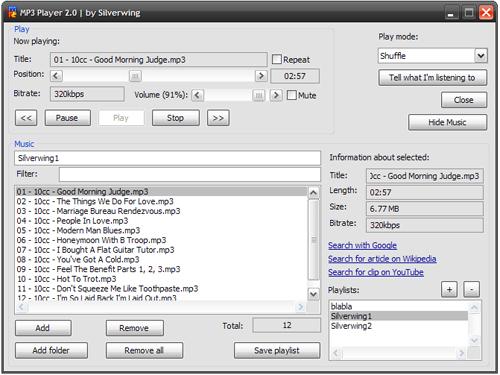
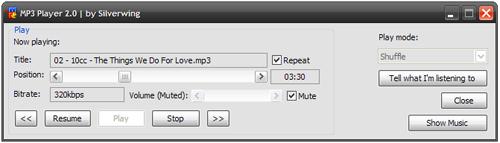
My MP3 Player script for mIRC.
No weird, unnecessary features. Just a basic MP3 player with some extra's ;)
Features:
Bold features are new in version 2.0
NOTE: The idea for a position scrollbar and volume scrollbar is token from Neptune and Daveohs MP3 Player. My script however is built from scratch, so I did not took their script, just the idea. Big thanks to them for that!
All other features might also be in other MP3 Players, but I did not take a look at them before writing my own ;)
Installation:
Just copy the script in an (empty) remote file, then save and use /mp3player or the right mouse button menu to open!
How to use:
Some basic instructions for functions that don't use buttons with their names on it:
Note that changes to a playlist will ONLY be saved if you press the Save playlist button
I tested it for bugs, but there might still be some. If you find one, please tell me!
menu status,channel,query,nicklist,menubar {
  MP3 Player: /mp3player
}

alias mp3player {
  if (!$dialog(MP3PLAYER)) {
    /dialog -md MP3PLAYER MP3PLAYER
  }
  else {
    /dialog -vie MP3PLAYER MP3PLAYER
  }
}

dialog MP3PLAYER {
  title "MP3 Player 2.0 | by Silverwing"
  size -1 -1 330 234
  option dbu
  ;=================================================================
  box "Play", 1, 3 1 219 74
  ;==============================
  text "Now playing:", 2, 7 9 50 8
  ;==============================
  text "Title:", 3, 7 21 20 8
  edit "", 4, 31 20 146 10, read autohs
  text "Position:", 5, 7 31 21 8
  scroll "", 6, 31 32 146 8, range 0 100 horizontal bottom
  edit "", 44, 179 31 33 10, read center
  text "Bitrate:", 8, 7 44 21 8
  edit "", 9, 31 43 50 10, read
  ;==============================
  text "Volume:", 10, 82 45 42 8, right
  scroll "", 12, 126 44 61 9, range 0 65535 horizontal
  check "Mute", 7, 190 44 28 10
  ;==============================
  check "Repeat", 13, 180 21 34 8
  ;==============================
  button "<<", 40, 7 58 16 12
  button "Pause", 14, 27 58 32 12
  button "Play", 33, 63 58 32 12
  button "Stop", 15, 99 58 33 12
  button ">>", 41, 136 58 16 12
  ;=================================================================
  text "Play mode:", 22, 252 6 50 8
  combo 23, 251 17 74 46, drop
  ;==============================
  button "Tell what I'm listening to", 37, 251 31 74 12
  button "Close", 38, 293 46 32 12, ok
  ;==============================
  button "Hide Music", 49, 271 61 54 12
  ;=================================================================
  box "Music", 16, 3 78 323 153
  ;==============================
  edit "", 11, 7 86 206 10, autohs
  text "Filter:", 50, 9 98 25 8
  edit "", 51, 37 97 176 10
  list 17, 7 109 206 87, size hsbar vsbar
  text "Total:", 42, 147 200 21 8
  edit "", 43, 167 198 46 10, read center
  button "Add", 18, 7 199 39 12
  button "Add folder", 19, 7 214 50 12
  button "Remove", 20, 68 199 40 12
  button "Remove all", 21, 68 214 53 12
  button "Save playlist", 39, 154 214 59 12
  ;==============================
  text "Information about selected:", 24, 219 87 75 8
  ;==============================
  text "Title:", 25, 219 99 20 8
  edit "", 26, 243 98 79 10, read autohs
  text "Length:", 27, 219 109 21 8
  edit "", 28, 243 109 79 10, read
  text "Size:", 29, 219 120 22 8
  edit "", 30, 243 120 79 10, read
  text "Bitrate:", 31, 219 131 19 8
  edit "", 32, 243 131 79 10, read autohs
  ;==============================
  link "Search with Google", 34, 218 146 54 8
  link "Search for article on Wikipedia", 35, 218 155 76 8
  link "Search for clip on YouTube", 36, 218 164 77 8
  ;==============================
  text "Playlists:", 46, 218 176 40 8
  list 45, 218 186 103 41, sort size hsbar vsbar
  button "+", 47, 293 173 12 12
  button "-", 48, 308 173 12 12
}

on *:DIALOG:MP3PLAYER:*:*: {
  if ($devent == init) {
    if (%mp3.first != nope) {
      /set %mp3.first nope
      /set %mp3.playlist.list playlists.txt
      /set %mp3.playlist.dir
      /set %mp3.folder $mircdir
      /set %mp3.mode 1
    }
    if (!$file(%mp3.playlist).ctime) {
      if ($did(45).lines >= 1) {
        /set %mp3.playlist $did(45,1)
      }
    }
    ;=================================================================
    ; LOAD POSITION / SIZE
    ;=================================================================
    if (%mp3.xy) {
      /dialog -s $dname %mp3.xy $iif(%mp3.size == mini,330 78,330 234)
    }
    ;=================================================================
    ; MINI / NORMAL
    ;=================================================================
    if (%mp3.size == mini) {
      /dialog -bs $dname -1 -1 330 78
      /did -ar $dname 49 Show Music
    }
    else {
      /dialog -bs $dname -1 -1 330 234
      /did -ar $dname 49 Hide Music
      /set %mp3.size normal
    }
    ;=================================================================
    ; SET CURRENT VOLUME
    ;=================================================================
    /did -c $dname 12 $vol(master)
    /did -ar $dname 10 Volume $chr(40) $+ $int($calc(($vol(master) / 65535) * 100)) $+ % $+ $chr(41) $+ $chr(58)
    if ($vol(master).mute == $true) {
      /did -c $dname 7
      /did -b $dname 12
      /did -ar $dname 10 Volume (Muted) $+ $chr(58)
    }
    ;=================================================================
    ; PLAY MODE INIT
    ;=================================================================
    /did -ar $dname 23 Normal
    /did -a $dname 23 Repeat all
    /did -a $dname 23 Shuffle
    /did -c $dname 23 %mp3.mode
    ;=================================================================
    ; LOAD PLAYLIST
    ;=================================================================
    /loadplaylistlist
    /loadplaylist
    ;=================================================================
    ; ENABLE / DISABLE
    ;=================================================================
    /did -b $dname 6,14,15,33,37,40,41,48
  }
  if ($devent == edit) {
    ;=================================================================
    ; SEARCH
    ;=================================================================
    if ($did == 51) {
      if ($did(51) != $null) {
        /did -r $dname 17
        var %a = 1
        var %b = $lines(%mp3.playlist)
        while (%a <= %b) {
          if ($did(51) isin $nopath($read(%mp3.playlist,%a))) {
            /did -a $dname 17 $nopath($read(%mp3.playlist,%a))
          }
          inc %a
        }
      }
      else {
        /loadplaylist
      }
    }
  }
  if ($devent == dclick) {
    ;=================================================================
    ; LOAD PLAYLIST
    ;=================================================================
    if (($did == 45) && ($did(45).seltext)) {
      /set %mp3.playlist %mp3.playlist.dir $+ $did(45).seltext $+ .txt
      /loadplaylist
    }
    ;=================================================================
    ; PLAY FROM PLAYLIST
    ;=================================================================
    if (($did == 17) && $did(17).seltext) {
      /did -b $dname 33
      ./timerposition off
      /splay -p stop
      /set %mp3.status stop
      var %a = 1
      var %b = $lines(%mp3.playlist)
      while (%a <= %b) {
        if ($nopath($read(%mp3.playlist,%a)) == $did(17).seltext) {
          /playmp3 %a
        }
        inc %a
      }
      /did -e $dname 14,15,37,40,41
    }
  }
  if ($devent == scroll) {
    ;=================================================================
    ; SET POSITION
    ;=================================================================
    if ($did == 6) {
      ./timerposition -p
      /splay -p seek $int($calc(($did(6).sel / 100) * $insong.length))
      ./timerposition -r
    }
    ;=================================================================
    ; SET VOLUME
    ;=================================================================
    if ($did == 12) {
      /vol -v $did(12).sel
      /did -ar $dname 10 Volume $chr(40) $+ $int($calc(($vol(master) / 65535) * 100)) $+ % $+ $chr(41) $+ $chr(58)
    }
  }
  if ($devent == sclick) {
    ;=================================================================
    ; MUTE
    ;=================================================================
    if ($did == 7) {
      if ($vol(master).mute == $true) {
        /vol -vu2
        /did -u $dname 7
        /did -e $dname 12
        /did -ar $dname 10 Volume $chr(40) $+ $int($calc(($vol(master) / 65535) * 100)) $+ % $+ $chr(41) $+ $chr(58)
      }
      elseif ($vol(master).mute == $false) {
        /vol -vu1
        /did -c $dname 7
        /did -b $dname 12
        /did -ar $dname 10 Volume (Muted) $+ $chr(58)
      }
    }
    ;=================================================================
    ; PLAY MODE
    ;=================================================================
    if ($did == 23) {
      if ($did(23).seltext == Normal) {
        /set %mp3.mode 1
        /did -c $dname 23 %mp3.mode
      }
      if ($did(23).seltext == Repeat all) {
        /set %mp3.mode 2
        /did -c $dname 23 %mp3.mode
      }
      if ($did(23).seltext == Shuffle) {
        /set %mp3.mode 3
        /did -c $dname 23 %mp3.mode
      }
    }
    ;=================================================================
    ; REPEAT TRACK OVERRIDE
    ;=================================================================
    if ($did == 13) {
      if ($did(13).state == 1) {
        /did -b $dname 23
      }
      else {
        /did -e $dname 23
      }
    }
    ;=================================================================
    ; BROADCAST
    ;=================================================================
    if ($did == 37) {
      /describe $active $chr(91) $+ 10MP3 Player $+ $chr(93) 11 $+ $did(4) $+  $chr(91) $+ Bitrate: $&
        11 $+ $did(9) $+  $+ $chr(93) $+ !
    }
    ;=================================================================
    ; HIDE / SHOW MUSIC
    ;=================================================================
    if ($did == 49) {
      if ($did(49) == Hide Music) {
        /dialog -bs $dname -1 -1 330 78
        /did -ar $dname 49 Show Music
        /set %mp3.size mini
      }
      elseif ($did(49) == Show Music) {
        /dialog -bs $dname -1 -1 330 234
        /did -ar $dname 49 Hide Music
        /set %mp3.size normal
      }
    }
    ;=================================================================
    ; PREVIOUS
    ;=================================================================
    if ($did == 40) {
      if (%mp3.number == 1) {
        /playmp3 $did(17).lines
      }
      else {
        /playmp3 $calc(%mp3.number - 1)
      }
    }
    ;=================================================================
    ; PAUSE / RESUME
    ;=================================================================
    if ($did == 14) {
      if (%mp3.status == play) {
        ./timerposition -p
        /splay -p pause
        /set %mp3.status pause
        /did -ar $dname 14 Resume
      }
      elseif (%mp3.status == pause) {
        ./timerposition -r
        /splay -p resume
        /set %mp3.status play
        /did -ar $dname 14 Pause
      }
    }
    ;=================================================================
    ; PLAY
    ;=================================================================
    if ($did == 33) {
      /did -b $dname 33
      /playmp3 %mp3.number
    }
    ;=================================================================
    ; STOP
    ;=================================================================
    if ($did == 15) {
      ./timerposition off
      /splay -p stop
      /set %mp3.status stop
      /did -c $dname 6 0
      /did -b $dname 6,14,15,37
      /did -e $dname 33
      /did -ar $dname 14 Pause
    }
    ;=================================================================
    ; NEXT
    ;=================================================================
    if ($did == 41) {
      if (%mp3.number == $did(17).lines) {
        /playmp3 1
      }
      else {
        /playmp3 $calc(%mp3.number + 1)
      }
    }
    ;=================================================================
    ; MP3 SELECT
    ;=================================================================
    if ($did == 17) {
      if ($did(17).seltext) {
        /did -e $dname 20
        var %a = 1
        var %b = $lines(%mp3.playlist)
        while (%a <= %b) {
          if ($nopath($read(%mp3.playlist,%a)) == $did(17).seltext) {
            /did -ar $dname 26 $did(17).seltext
            /did -ar $dname 28 $right($duration($calc($sound($read(%mp3.playlist,%a)).length / 1000),3),-3)
            /did -ar $dname 30 $round($calc($file($read(%mp3.playlist,%a)).size / 1048576),2) MB
            /did -ar $dname 32 $sound($read(%mp3.playlist,%a)).bitrate $+ kbps
          }
          inc %a
        }
      }
    }
    ;=================================================================
    ; ADD FILE
    ;=================================================================
    if ($did == 18) {
      var %addfile = $sfile(%mp3.folder $+ *.mp3;*.m3u,Select MP3 or M3U file,Add)
      if (%addfile) {
        if ($right(%addfile,4) == .mp3) {
          /addfile %addfile
        }
        if ($right(%addfile,4) == .m3u) {
          if ($read(%addfile,1) == #EXTM3U) {
            var %a = 3
          }
          else {
            var %a = 1
          }
          var %b = $lines(%addfile)
          while (%a <= %b) {
            if ($read(%addfile,%a) == $nopath($read(%addfile,%a))) {
              /addfile $left(%addfile,- $+ $len($nopath(%addfile))) $+ $read(%addfile,%a)
            }
            else {
              /addfile $read(%addfile,%a)
            }
            if ($read(%addfile,1) == #EXTM3U) {
              inc %a 2
            }
            else {
              %inc %a
            }
          }
        }
      }
      /loadplaylist noplbak
    }
    ;=================================================================
    ; ADD FOLDER
    ;=================================================================
    if ($did == 19) {
      var %addfolder = $sdir(%mp3.folder,Select folder with MP3 files)
      if (%addfolder) {
        var %tmp = $findfile(%addfolder,*.mp3,0,/addfile $1-)
      }
      /loadplaylist noplbak
    }
    ;=================================================================
    ; REMOVE
    ;=================================================================
    if ($did == 20) {
      var %a = 1
      var %b = $lines(%mp3.playlist)
      while (%a <= %b) {
        if ($nopath($read(%mp3.playlist,%a)) == $did(17).seltext) {
          if ($read(%mp3.playlist,%a) == $insong.fname) {
            ./timerposition off
            /splay -p stop
            /set %mp3.status stop
            /did -b $dname 6,14,15,37,40,41
            /did -r $dname 4,9,44
            /did -ar $dname 14 Pause
          }
          /write -dl $+ %a %mp3.playlist
        }
        inc %a
      }
      /loadplaylist noplbak
    }
    ;=================================================================
    ; REMOVE ALL
    ;=================================================================
    if ($did == 21) {
      ./timerposition off
      /splay -p stop
      /set %mp3.status stop
      /did -b $dname 6,14,15,37,40,41
      /did -r $dname 4,9,44
      /did -ar $dname 14 Pause
      /write -c %mp3.playlist
      /loadplaylist noplbak
    }
    ;=================================================================
    ; WEBLINKS
    ;=================================================================
    if ($did == 34) {
      if ($did(17).seltext) {
        /url -an http://www.google.com/search?hl=en&fkt=1828&fsdt=2725&q= $+ $html($left($did(17).seltext,-4)) $+ &btnG=Google+Search&aq=f&oq=
      }
    }
    if ($did == 35) {
      if ($did(17).seltext) {
        /url -an http://en.wikipedia.org/w/index.php?title=Special%3ASearch&search= $+ $html($left($did(17).seltext,-4)) $+ &fulltext=Search
      }
    }
    if ($did == 36) {
      if ($did(17).seltext) {
        /url -an http://www.youtube.com/results?search_query= $+ $html($left($did(17).seltext,-4)) $+ &search=Search
      }
    }
    ;=================================================================
    ; SELECT PLAYLIST
    ;=================================================================
    if (($did == 45) && ($did(45).seltext)) {
      /did -e $dname 48
    }
    ;=================================================================
    ; SAVE PLAYLIST
    ;=================================================================
    if (($did == 39) && ($did(11) != $null)) {
      ./remove %mp3.playlist $+ .plbak
      if ($did(11)) {
        ./rename %mp3.playlist %mp3.playlist.dir $+ $did(11) $+ .txt
        var %a = 1
        var %b = $lines(%mp3.playlist.list)
        while (%a <= %b) {
          if ($read(%mp3.playlist.list,%a) == $nopath(%mp3.playlist)) {
            /write -l $+ %a %mp3.playlist.list $did(11) $+ .txt
            /set %mp3.playlist %mp3.playlist.dir $+ $did(11) $+ .txt
          }
          inc %a
        }
      }
      /loadplaylistlist
      /loadplaylist
    }
    ;=================================================================
    ; ADD PLAYLIST
    ;=================================================================
    if ($did == 47) {
      var %newplaylist = $$?="New playlist title (no spaces allowed):"
      /dialog -vie $dname $dname
      if (%newplaylist) {
        var %a = 1
        var %b = $lines(%mp3.playlist.list)
        while (%a <= %b) {
          if ($left($read(%mp3.playlist.list,%a),-4) == %newplaylist) {
            goto endaddplaylist
          }
          inc %a
        }
        /write %mp3.playlist.list %newplaylist $+ .txt
        /write -c %mp3.playlist.dir $+ %newplaylist $+ .txt
        /set %mp3.playlist %mp3.playlist.dir $+ %newplaylist $+ .txt
        /loadplaylistlist
        /loadplaylist
      }
      :endaddplaylist
    }
    ;=================================================================
    ; REMOVE PLAYLIST
    ;=================================================================
    if ($did == 48) {
      var %a = 1
      var %b = $lines(%mp3.playlist.list)
      while (%a <= %b) {
        if ($left($read(%mp3.playlist.list,%a),-4) == $did(45).seltext) {
          /write -dl $+ %a %mp3.playlist.list
        }
        inc %a
      }
      if (($did(11) == $did(45).seltext) && ($did(45).lines >= 2)) {
        /set %mp3.playlist %mp3.playlist.dir $+ $did(45,1) $+ .txt
      }
      ./remove %mp3.playlist.dir $+ $did(45).seltext $+ .txt
      ./remove %mp3.playlist.dir $+ $did(45).seltext $+ .txt.plbak
      /did -b $dname 48
      /loadplaylistlist
      /loadplaylist
    }
  }
  if ($devent == close) {
    ;=================================================================
    ; CLOSE
    ;=================================================================
    ./timerposition off
    /splay -p stop
    /set %mp3.status stop
    /unset %mp3.play
    /set %mp3.xy $dialog($dname).x $dialog($dname).y
    var %tmp = $findfile(%mp3.playlist.dir,*.plbak,0,0,/replaceplbak $1-)
  }
}

alias replaceplbak {
  ./remove %mp3.playlist.dir $+ $left($nopath($1-),-6)
  ./rename %mp3.playlist.dir $+ $nopath($1-) $left(%mp3.playlist.dir $+ $nopath($1-),-6)
}

on *:MP3END: {
  if ($dialog(MP3PLAYER)) {
    ./timerposition off
    if ($did(MP3PLAYER,13).state == 1) {
      ./timerposition 0 1 /mp3position MP3PLAYER 6
      /splay -p %mp3.play
      /set %mp3.status play
    }
    else {
      /did -c MP3PLAYER 6 0
      /did -b MP3PLAYER 6,14,15,37
      var %current = $did(MP3PLAYER,4)
      var %b = $did(MP3PLAYER,17).lines
      if ((%mp3.mode == 1) || (%mp3.mode == 2)) {
        var %a = 1
        while (%a <= %b) {
          if ($did(MP3PLAYER,17,%a).text == %current) {
            if ($calc(%b - %a) >= 1) {
              /playmp3 $calc(%mp3.number + 1)
            }
            else {
              if (%mp3.mode == 1) {
                /did -ar MP3PLAYER 4 End of playlist!
              }
              if (%mp3.mode == 2) {
                /playmp3 1
              }
            }
          }
          inc %a
        }
      }
      if (%mp3.mode == 3) {
        while (a = a) {
          var %shuffle.new = $rand(1,%b)
          if ($did(MP3PLAYER,17,%shuffle.new) != %current) {
            goto next
          }
        }
        :next
        var %c = 1
        var %d = $lines(%mp3.playlist)
        while (%c <= %b) {
          if ($nopath($read(%mp3.playlist,%c)) == $did(MP3PLAYER,17,%shuffle.new).text) {
            /playmp3 %c
          }
          inc %c
        }
      }
    }
  }
}

alias playmp3 {
  /did -ar MP3PLAYER 4 $nopath($read(%mp3.playlist,$1))
  /did -ar MP3PLAYER 9 $sound($read(%mp3.playlist,$1)).bitrate $+ kbps
  /did -ar MP3PLAYER 44 $right($duration($calc($sound($read(%mp3.playlist,$1)).length / 1000),3),-3)
  /did -ar MP3PLAYER 14 Pause
  /set %mp3.number $1
  if ($did(MP3PLAYER,33).enabled == $false) {
    /did -e MP3PLAYER 6,14,15,37,40,41
    ./timerposition 0 1 /mp3position MP3PLAYER 6
    /set %mp3.number $1
    /set %mp3.play $read(%mp3.playlist,$1)
    /splay -p %mp3.play
    /set %mp3.status play
  }
}

alias loadplaylistlist {
  /did -r MP3PLAYER 45
  var %a = 1
  var %b = $lines(%mp3.playlist.list)
  while (%a <= %b) {
    /did -a MP3PLAYER 45 $left($nopath($read(%mp3.playlist.list,%a)),-4)
    inc %a
  }
}

alias loadplaylist {
  if ($did(45).lines == 0) {
    /write -c %mp3.playlist.dir $+ NewPlaylist.txt
    /write %mp3.playlist.list NewPlaylist.txt
    /set %mp3.playlist %mp3.playlist.dir $+ NewPlaylist.txt
    /loadplaylistlist
  }
  if ($1 != noplbak) {
    if ($file(%mp3.playlist).ctime) {
      if ($file(%mp3.playlist $+ .plbak).ctime) {
        ./remove %mp3.playlist
        ./rename %mp3.playlist $+ .plbak %mp3.playlist
      }
      else {
        ./copy %mp3.playlist %mp3.playlist $+ .plbak
      }
    }
  }
  /did -r MP3PLAYER 17,26,28,30,32
  /did -b MP3PLAYER 17,20,21
  var %a = 1
  var %b = $lines(%mp3.playlist)
  while (%a <= %b) {
    if ($file($read(%mp3.playlist,%a)).ctime) {
      /did -a MP3PLAYER 17 $nopath($read(%mp3.playlist,%a))
    }
    inc %a
  }
  /did -z MP3PLAYER 17
  if ($did(MP3PLAYER,17).lines > 0) {
    /did -e MP3PLAYER 17,21
  }
  /did -ar MP3PLAYER 11 $left($nopath(%mp3.playlist),-4)
  /did -ar MP3PLAYER 43 $did(MP3PLAYER,17).lines
}

alias addfile {
  if ($1-) {
    var %a = 1
    var %b = $lines(%mp3.playlist)
    while (%a <= %b) {
      if ($nopath($read(%mp3.playlist,%a)) == $nopath($1-)) {
        return
      }
      inc %a
    }
    /write %mp3.playlist $1-
    /set %mp3.folder $left($1-,- $+ $len($nopath($1-)))
  }
}

alias mp3position {
  if (($1) && ($2)) {
    /did -c $1 $2 $calc(($insong.pos / $insong.length) * 100)
  }
}

html {
  return $replace($1,$chr(32),$chr(37) $+ 20)
}

; BROADCAST
;=================================================================
if ($did == 37) {
/describe $active 0,1 $chr(91) $+ 9,1M4,1P3 9,1P4,1layer 0,1 $+ $chr(93) 15,1 $+ $did(4) $+ 0,1 $chr(91) $+ 15,1MP314,1: $&
0,1 $+ $chr(93) $+
}
Is a better looking style.
Any other styles? If you can make another cool one post it here ill be interested.
why make it
alias playmp3 {
  /did -ar MP3PLAYER 4 $nopath($read(%mp3.playlist,$1))
  /did -ar MP3PLAYER 9 $sound($read(%mp3.playlist,$1)).bitrate $+ kbps
  /did -ar MP3PLAYER 44 $right($duration($calc($sound($read(%mp3.playlist,$1)).length / 1000),3),-3)
  /did -ar MP3PLAYER 14 Pause
  /set %mp3.number $1
  if ($did(MP3PLAYER,33).enabled == $false) {
    /did -e MP3PLAYER 6,14,15,37,40,41
    ./timerposition 0 1 /mp3position MP3PLAYER 6
    /set %mp3.number $1
    /set %mp3.play $read(%mp3.playlist,$1)
    /splay -p %mp3.play
    /set %mp3.status play
  }
}
when u can make it
alias playmp3 {
  /did -ar MP3PLAYER 4 $nopath($read(%mp3.playlist,$1))
  /did -ar MP3PLAYER 9 $sound($read(%mp3.playlist,$1)).bitrate $+ kbps
  /did -ar MP3PLAYER 44 $right($duration($calc($sound($read(%mp3.playlist,$1)).length / 1000),3),-3)
  /did -ar MP3PLAYER 14 Pause
  /set %mp3.number $1
  if ($did(MP3PLAYER,33).enabled == $false) {
    /did -e MP3PLAYER 6,14,15,37,40,41
    ./timerposition 0 1 /mp3position MP3PLAYER 6
    /set %mp3.number $1
    /set %mp3.play $read(%mp3.playlist,$1)
    /splay -p %mp3.play
    /set %mp3.status play
    /describe $active $chr(91) $+ 7,14MP3 Player $+ $chr(93) 11 $+ $did(4) $+  $chr(91) $+ Bitrate: $&
      4,14 $+ $did(9) $+  $+ $chr(93) $+ !
  }
}
so youdont need the show what me listening to but have a switch or somehting in case you dont want to

As for the reported bugs..:
2. When I click an mp3 in the list the Play button does not become active.
This is not a bug. As explained above in the instruction, you have to doubleclick a MP3 to play in this version.
1. I Doesnt store the folder, so there should be an option to "Remember" or Save Settings.
How do you mean that? Because it does remember the latest folder you've added something from in the Add and Add folder dialogs.
4. When I click the >> button it did not "seek" forward instead it cleared out the title, track time, and the track slider.
I'm not able to reprocude this bug (?). It works perfect for me. Maybe there were some weird characters in the filmename?
3. Still no Message delivery with Tags like &Artist, &Song, &Title, &Length
Oops totally forgot about that. It will be added to the next version.
when i press the buttons to scroll up and down the volume, well its not working, i need to move it with the little bar.
I'm aware of this one. But I don't know how to solve it. It actually works (try pressing the volume down button when the volume is 100%. It should become 99%. The problem is that pressing the buttons only increases/decreases the volume by a tiny little bit. If anyone knows how to fix this, please tell me!

Ok, Well first off 2 things
Thanks
Jay

And that kids is how u make a proper mp3 dialog;p
dialog MP3PLAYER {
  title "MP3 Player 1.2 | by Silverwing"
  size -1 -1 230 233
  option dbu
  box "Track Info Options", 39, 2 215 225 16
  box "Play Options", 9, 2 73 225 27
  box "Mp3 List", 16, 2 102 225 87
  box "", 8, 2 52 225 18
  box "File Options", 7, 2 193 225 23
  box "Play", 1, 2 1 225 55
  text "Now playing:", 2, 7 9 33 8
  text "Track:", 3, 7 21 16 8
  edit "", 4, 30 20 146 10, read autohs
  text "Position:", 5, 7 31 21 8
  scroll "", 6, 30 32 146 8, horizontal
  text "Volume:", 10, 75 85 22 8
  edit "", 11, 170 84 14 10, read center
  scroll "", 12, 100 84 66 9, horizontal
  check "Repeat Track", 13, 133 44 42 8
  button "<<", 40, 7 43 16 10
  button "Pause", 14, 26 43 25 10
  button "Stop", 15, 86 43 25 10
  button ">>", 41, 113 43 16 10
  button "Hide Music", 49, 194 202 30 10
  list 17, 7 112 217 71, hsbar vsbar size
  text "Total Mp3's:", 42, 132 203 31 8
  edit "", 43, 165 202 28 10, read center
  button "Add", 18, 7 202 25 10
  button "Add folder", 19, 99 202 30 10
  button "Remove", 20, 36 202 25 10
  button "Remove all", 21, 66 202 30 10
  text "Play mode:", 22, 6 85 27 8
  combo 23, 33 84 40 46, drop
  text "Title:", 25, 6 59 15 8
  edit "", 26, 22 58 202 10, read autohs
  text "Length:", 27, 181 18 21 8
  edit "", 28, 199 17 25 10, read
  text "Size:", 29, 181 28 14 9
  edit "", 30, 199 28 25 10, read
  text "Bitrate:", 31, 181 39 19 8
  edit "", 32, 199 39 25 10, read autohs
  button "Play", 33, 52 43 32 10
  link "Search with Google", 34, 10 222 49 8
  link "Search for article on Wikipedia", 35, 69 222 76 8
  link "Search for clip on YouTube", 36, 153 222 66 8
  button "BroadCast", 37, 189 78 35 10
  button "Close", 38, 189 88 35 10, ok
}
Here's a screenshot of the new (upcoming) version: http://www.hawkee.com/profile/img/2051/
I'm not yet finished coding it, but new features are Mute checkbox, Playlists, more broadcast options and a new layout.
A search function might come as well. I don't think I'd be able to realise Artist, Genre, Year, Albums things. This is because there are various versions of ID3tags, and I don't know anything about them. This I think will result in a half-working fuction which only displays the right information in SOME cases.
oh and one more thing: I don't think this mp3 player will ever be suitable for playing and managing thousands of mp3's, but you can try if you want :P