 By Scakk on Apr 17, 2008
This dialog allows you to use various nicks while roleplaying. It stores the nicks you wish to use , the channels you want to use them in and can easily be turned on and off. To choose or change nicks just double click one. To easily change channels while RolePlaying double click a channel to make it the active one. You can add/remove nicks and add/remove channels ( will add a # if not used ). The list will be updated each time a new nick/channel is added or deleted. It stores the nicks and channels to a variable which it loads each time it is opened to the list for each. There is also a button that will shrink it so you can keep it open and yet out o fthe way. The title of the dialog will state wether RPing is on/off and also what nick , if one is chosen , is being used currently.
*Original idea for the RolePlaying script from Niveusluna.
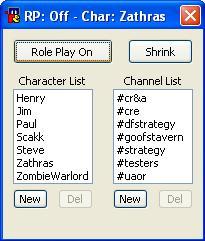
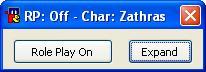
Update: Nick and Channel list are now alphabetical ( April 18th '08 )
Update: Nick and Channel list update each time the Shrink/Expand button pushed ( May 20th '08 )
menu channel {
  [RolePlay]: dialog $iif($dialog(RPing), -va , -ma) RPing RPing
}
dialog RPing {
  title "Role Playing"
  size -1 -1 200 210
  button "Role Playing", 1, 10 10 100 25
  text "Character List", 2, 5 45 90 20, center
  text "Channel List", 3, 105 45 90 20, center
  list 4, 10 60 80 100
  list 5, 110 60 80 100
  button "New", 7, 10 160 35 20
  button "Del", 8, 55 160 35 20
  button "New", 9, 110 160 35 20
  button "Del", 10, 155 160 35 20
  edit "", 11, 110 185 45 20, autohs
  button "Yes", 12, 110 185 35 20
  button "No", 13, 155 185 35 20
  button "Add", 14, 155 185 35 20
  edit "", 15, 10 185 45 20, autohs
  button "Add", 16, 55 185 35 20
  button "Shrink", 17, 125 10 65 25
  button "Yes", 18, 10 185 35 20
  button "No", 19, 55 185 35 20
}
on *:dialog:RPing:*:*: {
  if ($devent == init) {
    didtok $dname 4 32 $sorttok(%rpcharacters,32)
    didtok $dname 5 32 $sorttok(%rpchannels,32)
    did -h $dname 11-16,18-19
    did -b $dname 8,10
    $iif(%rping = 1, did -ra $dname 1 Role Play Off, did -ra $dname 1 Role Play On)
    dialog -t $dname $iif(%rping == 1, RP: On $iif(%rpcharacter, - Char: %rpcharacter), RP: Off  $iif(%rpcharacter, - Char: %rpcharacter))
  }
  if ($devent == edit) {
    if ($did == 11) { $iif($did(11).text, did -e $dname 14, did -b $dname 14 ) }
    if ($did == 15) { $iif($did(15).text, did -e $dname 16, did -b $dname 16 ) }
  }
  if ($devent == dclick) {
    if ($did == 4) { $iif($did(4).seltext, set %rpcharacter $did(4).seltext) | dialog -t $dname $iif(%rping == 1, RP: On $iif(%rpcharacter, - Char: %rpcharacter), RP: Off  $iif(%rpcharacter, - Char: %rpcharacter)) }
    if ($did == 5) { join $did(5).seltext }
  }
  if ($devent == sclick) {
    if ($did == 1) { set %rping $iif(%rping == 1, 0, 1) | did -ra $dname 1 $iif(%rping = 1, Role Play Off, Role Play On) | dialog -t $dname $iif(%rping == 1, RP: On  $iif(%rpcharacter, - Char: %rpcharacter), RP: Off  $iif(%rpcharacter, - Char: %rpcharacter))   }
    if ($did == 4) { $iif($did(4).seltext, did -e $dname 7-8) | did -h $dname 11-16 | did -b $dname 10 }
    if ($did == 5) { $iif($did(5).seltext, did -e $dname 10) | did -h $dname 11-16,18,19 | did -b $dname 8 }
    if ($did == 7) { did -v $dname 15,16 | did -e $dname 15 | did -b $dname 10,14,16 | did -h $dname 11-14,18,19 }
    if ($did == 8) { did -v $dname 18-19 | did -h $dname 12,13 }
    if ($did == 9) { did -v $dname 11,14 | did -e $dname 11 | did -b $dname 8,10,14 | did -h $dname 12,13,15-16 }
    if ($did == 10) { did -v $dname 12-14 | did -h $dname 11,14,18,19 }
    if ($did == 12) { set %rpchannels $remtok(%rpchannels,$did(5).seltext,1,32) | .timer 1 1 dialog -x RPing | .timer 1 2 dialog -m RPing RPing }
    if ($did == 13) { did -h $dname 12,13 | did -b $dname 10 }
    if ($did == 14) { set %rpchannels $addtok(%rpchannels,$( $iif($left($did(11).text,1) != $chr(35), $( $chr(35) $+ $did(11).text), $did(11).text) ),32) | .timer 1 1 dialog -x RPing | .timer 1 2 dialog -m RPing RPing }
    if ($did == 16) { set %rpcharacters $addtok(%rpcharacters,$did(15).text,32) | .timer 1 1 dialog -x RPing | .timer 1 2 dialog -m RPing RPing }
    if ($did == 17) {
      did -r $dname 4,5
      didtok $dname 4 32 $sorttok(%rpcharacters,32)
      didtok $dname 5 32 $sorttok(%rpchannels,32)
      $iif($dialog(RPing).h == 72, did -ra $dname 17 Shrink, did -ra $dname 17 Expand)
      $iif($dialog(RPing).h == 72, dialog -s $dname -1 -1 200 210 , dialog -s $dname -1 -1 200 40)
      if ($dialog(RPing).h == 72) { did -u $dname 4,5 | did -b $dname 8,10 | did -h $dname 11-16,18-19 }
    }
    if ($did == 18) { set %rpcharacters $remtok(%rpcharacters,$did(4).seltext,1,32) | $iif($did(4).seltext == %rpcharacter, unset %rpcharacter) | .timer 1 1 dialog -x RPing | .timer 1 2 dialog -m RPing RPing }
    if ($did == 19) { did -h $dname 18,19 | did -b $dname 8 }
  }
}

on *:INPUT:#:{
  if (%rping == 1) {
    if ($chan isin %rpchannels) {
      if (($me isop $chan) || ($me ishop $chan) || (h isincs $usermode)) {
        if ($left($$1,1) != /) {
          .quote $iif(h isincs $usermode, fsay $chan %rpcharacter $iif($left($1,1) == $chr(58), $($chr(58) $+ $$1-), $$1-)  , npc $chan %rpcharacter $iif($left($1,1) == $chr(58), $($chr(58) $+ $$1-), $$1-))
          haltdef
        }
        else if ($$1 == /me) {
          .quote $iif(h isincs $usermode, faction $chan %rpcharacter $iif($left($2,1) == $chr(58), $($chr(58) $+ $$2-), $$2-)  , npca $chan %rpcharacter $iif($left($2,1) == $chr(58), $($chr(58) $+ $$2-), $$2-))
          haltdef
        }
      }
    }
  }
}