
Top

Blacklist System

+ 2 likes
Please Register to submit score.
Average Score  9.2
Scores Submitted  9
Date Added  Mar 16, 2008
Last Updated  Mar 16, 2008
Tags  ban  blacklist  dialog  kick  shitlist 

Introduction

Copy/paste in a new remote .
Once you load the script open the dialog to set it up.
turn on the power, and set what ban mask you want it to work with.

You Must Be An OP On The Channel You Are Trying To Add The Nick On For It To Work.

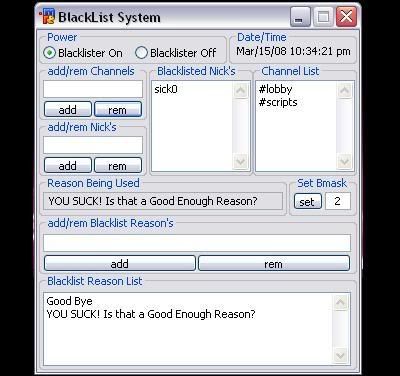
then add the channels you want it to work on. after thats done you can enter nicks either from the dialog it's self or from rightclicking the menubar or channel, or you can right click the nick you want to black list as well. For removing the nicks. Remove the nicks either in the dialog or right click the menubar or channel.


enjoy......

im still wotking all the bugs out so i will be updating as needed.
and yes i know i made it a bit long for a blacklister, but eh idc....

just a pic of the dialog...


Grab the Code

Comments

  (7)  RSS
DarkDaemon
Comments: 51
 
mIRC Snippet:  Blacklist System
Posted on Mar 16, 2008 12:50 am
Add part dosent work... 5/10
napa182
Comments: 953
 
mIRC Snippet:  Blacklist System
Posted on Mar 16, 2008 12:53 am
are you +o in the channel you are trying to add the nick?
DarkDaemon
Comments: 51
 
mIRC Snippet:  Blacklist System
Posted on Mar 16, 2008 1:11 am
yes it does say \"Add\" but when i press it nothing happens the rest works fine
napa182
Comments: 953
 
mIRC Snippet:  Blacklist System
Posted on Mar 16, 2008 1:27 am
ok updated added a popup telling you that you are not an op on the channel that you are trying to add the nick to. cuz it seems people can read the intro =/
DarkDaemon
Comments: 51
 
mIRC Snippet:  Blacklist System
Posted on Mar 16, 2008 1:33 am
ty
EL
Comments: 1,155
 
mIRC Snippet:  Blacklist System
Posted on Mar 16, 2008 2:36 pm
LOL
ZiX
Comments: 52
 
mIRC Snippet:  Blacklist System
Posted on Mar 17, 2008 9:12 am
Very Nice, napa182 :)

Please Register or Login to start posting comments.
Bottom