 By Daveoh on Jun 23, 2007
This is a simple local countdown script, which will count down and from a date.
Usage: /countdown
Acceptable formats for date:January 1 1970 00:00:00
3rd August 1987 3:46pm
21/4/72 1:30:37
Wed 1998-3-27 21:16
Example: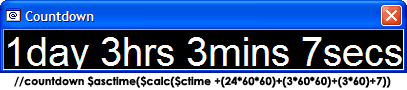
;;Countdown script
;;By Daveoh
alias countdown {
  if ($1 == drawwin) {
    if !$window(@Countdown) { .timercountdown off | halt }
    window @Countdown -1 -1 $calc($width($duration($calc($ctime($2-) - $ctime)),Arial,40)+8) $calc($height($duration($calc($ctime($1-) - $ctime)),Arial,40)+28)
    drawtext -br @Countdown 16777215 0 Arial 40 0 0 $duration($calc($ctime($2-) - $ctime))
    halt
  }
  if !$ctime($1-) { echo -ag * /countdown: insufficient parameters | halt }
  window -Cdk0p +t @Countdown -1 -1 $calc($width($duration($calc($ctime($1-) - $ctime)),Arial,40)+8) $calc($height($duration($calc($ctime($1-) - $ctime)),Arial,40)+28)
  drawtext -br @Countdown 16777215 0 Arial 40 0 0 $duration($calc($ctime($1-) - $ctime))
  .timercountdown -h 0 1000 countdown drawwin $1-
}

I explained in the intro that this script will count down AND FROM a date.
The amount of CPU used by the timer seems minimal, the CPU usage of mIRC for me is usually under 1% using the script or not. The only point of the switch is so that the countdown does not go out of sync from what it should be, otherwise you could be seconds to minutes out.