this is for them lazy people to do the modes, type /lm when its in your remotes and the dialog will open. Select the nickname and hit the mode you want to do, or select the kick to do it.
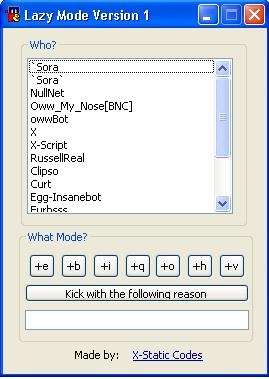
Thank you to Sean for the help he contributed
alias lm {
  if ( $dialog(lazy_mode) ) { dialog -v lazy_mode lazy_mode  }
  else { dialog -md lazy_mode lazy_mode }
}

dialog lazy_mode {
  title "Lazy Mode Version 1"
  size -1 -1 132 173
  option dbu
  box "Who?", 2, 9 5 113 94
  list 1, 12 15 103 78, size vsbar
  box "What Mode?", 3, 8 101 117 56
  button "+e", 4, 13 113 13 12
  button "+b", 5, 29 113 13 12
  button "+i", 6, 45 113 13 12
  button "+q", 7, 61 113 13 12
  button "+o", 8, 76 113 13 12
  button "+h", 9, 92 113 13 12
  button "+v", 10, 108 113 13 12, flat
  button "Kick with the following reason", 11, 11 128 112 9
  edit "", 12, 11 141 112 10
  text "Made by:", 13, 36 160 25 8
  link "X-Static Codes", 14, 65 160 46 8
}

on *:dialog:lazy_mode:*:*: {
  if ( $devent == init ) {
    set %lm.chan $active
    var %total = $nick($active,0), %x = 1
    while ( %x <= %total ) {
      did -i lazy_mode 1 %x $nick($active,%x)
      inc %x
    }
  }
  elseif ( $devent == sclick ) {
    if ($did == 4) { .mode %lm.chan +e $did(1).seltext }
    elseif ($did == 5) { .mode %lm.chan +b $did(1).seltext }
    elseif ($did == 6) { .mode %lm.chan +I $did(1).seltext }
    elseif ($did == 7) { .mode %lm.chan +q $did(1).seltext }
    elseif ($did == 8) { .mode %lm.chan +o $did(1).seltext }
    elseif ($did == 9) { .mode %lm.chan +h $did(1).seltext }
    elseif ($did == 10) { .mode %lm.chan +v $did(1).seltext }
    elseif ($did == 11) { .kick %lm.chan $did(1).seltext $did(12) }
    elseif ($did == 14) { .run http://xstatic.webtastix.co.nz/ }
  }
}

FURBY:
on me:*:join:#: {
var %x = 1, %y = $nick($chan,0)
while %x <= %y {
if $nick($chan,%y) isop $chan {
did -a DNAME ID $nick($chan,%y).pnick
}
inc %x
}
}
Something within thoose lines.
Also, what about using 1 button, for + and -.
If the guy has voice, the + will be a -, instead of having two buttons. Im sure you can do that :-)